You’re ready to test a WooCommerce extension update. AI helps you work through the release notes, and you have a draft test plan open. Then a colleague asks whether the update affects any custom checkout rules. You know a few client stores have them. Which ones, though?
You ask in Slack. The developer who knows those sites is in meetings until lunch, so you pick up another ticket while you wait.
Another agency uses the same AI tool, but its developer can find the checkout exceptions in each store’s notes. There’s a test order to try, with the expected discount written beside it. They can get on with the check.
As AI shortens the time you spend preparing changes, these everyday details have more influence over how much work you finish. We’ll look at how to make your team’s site knowledge easier to use and give developers the evidence they need to judge AI suggestions. We’ll also cover how to tell whether those improvements free up time across your client portfolio.
Where the work starts piling up
With AI’s help, you finish a patch in twenty minutes and leave it for review. Your technical lead needs to check whether the same customization runs on another client’s site, but they can’t get to it until Thursday. You keep working. By the time they open that first ticket, you have four more patches waiting for them.
You can see the problem in the ticket timestamps. Writing takes minutes, and waiting takes days. Buying another AI subscription doesn’t change that delay.
In Atlassian’s 2025 developer experience research, 50% of developers report losing at least ten hours a week to non-coding work, largely because of organizational inefficiencies. The survey covers 3,500 developers and managers across six countries. Finding information ranks among the leading sources of wasted time. These are reported experiences, rather than measured time logs, but they give agencies a useful place to investigate.
Someone on your team may spend part of every review digging up repository links or reminding colleagues which sites share a customization. Even someone ready to conduct a test right then and there might have to wait for them to provide access.
Keeping those details in the site record and ensuring the developers covering it have the access they need prevents this. A colleague should be able to find the existing test instructions and get started. The lead can still step in when a change behaves unexpectedly, without also having to answer “Where’s the code?” every time.
The site knowledge your team keeps becomes more valuable
A wholesale store’s custom pricing endpoint takes several seconds to respond. When asked how to speed it up, an AI assistant suggests caching the response for ten minutes. That would save the site from calculating a price on every request.
Each customer has a negotiated rate, though. Serve a saved response to the wrong account, and a buyer can see another company’s pricing. The developer who writes the endpoint knows why it bypasses the shared cache. Someone picking up a performance ticket six months later may see an opportunity to make the site faster without realizing what that change exposes.
The comment beside the endpoint can be plain, of course. Something like, “Each wholesale account has its own negotiated price. Keep this response out of the shared cache,” would work fine.
In the site record, point colleagues to the code and identify two test accounts with different pricing. After a change, they can sign in with each account and compare the displayed price with the rate that buyer should receive.
That gives your colleague a reason to question a proposed WordPress caching change. It also gives an AI assistant more useful context when you ask it to review alternatives.
Think about what you’d mention when handing a site over to a colleague:
- “Purchasing uses this report at Monday’s meeting. It needs to be ready before then.”
- “The dates in the import use the supplier’s time zone.”
- “We’re waiting on this plugin issue before removing the workaround.” Include the issue link.
When a plugin update fixes the problem, you should make note of it and add the date. The old instructions can stay in place, and an AI summary can keep recommending a workaround your site no longer needs.
Use your agency’s approved AI tool, and take credentials out of anything you paste into it. Customer details can usually stay out too; include them only if the question requires them. Keep a link to the relevant code or settings alongside the answer so the next developer can check whether it matches what’s on the site.
Good diagnostics let developers judge AI suggestions faster
“Checkout feels slow sometimes” leaves plenty of room for guesses. An AI assistant can produce a plausible list of causes immediately. Useful diagnostics let you start eliminating them.
Small orders go through without a hitch. Put twelve different products in the cart, though, and the total takes six seconds to recalculate. An application performance monitoring trace points to the custom discount function. For every line in the cart, it goes back to the database and retrieves the same buyer’s order history again.
Now you have a specific question: can the function retrieve that history once and reuse it during the same calculation? You can ask AI to help inspect the code with that constraint in mind.
After changing it in staging, repeat the twelve-product test and check the query count. Verify that the discount stays correct when you change quantities. A shorter response time means little if the customer receives the wrong total.
If someone else on the team picks up the checkout investigation the next morning, they have the trace, but would they know you ran the test in staging with a wholesale account? You’ll need to put that detail in the ticket. For the WordPress error logs, give them the matching time window and time zone so they can find entries from the same test.
This matters when AI helps with the investigation, too. Splunk’s State of Observability 2025 surveys 1,855 observability professionals, and 48% identify poor data quality as their main obstacle to AI readiness. Leaving out which account triggers the discount rule gives an assistant less to work with, however detailed the trace looks.
It also improves your client update. You can explain that large carts repeatedly load the same order history and describe the test that checks your correction. The client gets an explanation of the delay, instead of another message saying you’re trying a few things.
Consistent environments make improvements useful across the portfolio
One performance fix can save work on several sites, provided you know where else to look.
Suppose a reporting plugin rebuilds a year’s order totals every fifteen minutes. The client only opens that report for a weekly meeting. You confirm that the repeated rebuilds consume database time and change the schedule to match how the client uses the report.
Your agency installs the same plugin on eleven other stores. With a current inventory, you can identify them and check their settings. Without one, someone opens dashboards individually or searches invoices for the plugin’s name.
“Where does this site keep its custom code?” gets old quickly when you manage multiple WordPress sites. Familiar file locations save a colleague some searching, as do records that use the same name for the same setting. Scheduling notes can settle questions that the plugin settings don’t answer, like whether the server triggers WordPress cron jobs.
“Staff checks this report throughout the day” belongs beside the refresh setting in the site notes. Copying another store’s weekly schedule would leave them working from stale figures. Include the installed plugin version in that record, too. A developer can waste time hunting for a scheduling control that exists in a newer release but doesn’t appear anywhere in this store’s settings.
AI can help compare exported settings or prepare a list of likely matches. Review that list against the actual sites before applying the change. Matching plugin names alone doesn’t prove clients use the feature the same way.
Add “How often does the client use this report?” to the plugin’s setup notes. The developer installing it on the next store can settle the schedule during onboarding. A report the client opens on Monday mornings hardly needs to rebuild every fifteen minutes all week. Your team already investigates that problem once; the next installation benefits from the answer.
Bring AI into the reviews you already run
Tuesday’s plugin review can mean a lot of time with changelogs open. For each site, someone needs to compare the installed version with the new release and work out which changes deserve a closer look. For example, a store with a custom discount rule needs particular attention to anything that changes how checkout calculates prices.
That gives an AI assistant a specific job. With the installed version and an explanation of the discount rule, it can pick out changes that might affect the calculation. The summary needs links back to the release notes, so your developer can read those entries in context. They still judge whether an update affects the store, but they have less material to sift through first.
“Check all our sites and tell us what needs attention” gives it much less to work with. It may produce an impressive-looking report that omits the one compatibility detail your developer needs.
Try the narrower task on a few sites you know well. Compare the output with your own review. Does it distinguish a proposed fix from a released one? Does it treat a missing version number as unknown, or fill the gap with a guess?
The script compares each site’s installed plugin version with the available release. It also flags missing configuration exports.
When a site fails to return its configuration, the report says, “Review incomplete. This site’s configuration export is missing.” This entry then keeps the site on the reviewer’s to-do list. An empty row could easily look like a site that passes the check.
Measure the capacity you gain
An afternoon without a string of “Where do I find this?” messages gives your technical lead time to finish client work. You can see the benefit well before you take on another account.
Your project and support tickets can show whether the delays you’re trying to shorten actually shrink. Depending on what keeps holding up the work, you might track:
- Release waiting time: How long does a completed change sit before someone can verify and release it?
- Investigation time: How long does the developer spend establishing the cause of a reported problem?
- Reopened tickets: How often does the same symptom return after the team marks a fix complete?
- Unplanned support hours: How much scheduled project time goes into unexpected repairs?
For example, let’s say there are six comparable maintenance tickets that each need the lead on the project to hunt down configuration details. After you improve the site records, review the next six tickets that come in. If people on the team can handle five without that interruption and the fixes hold, you have evidence that the notes help.
When somebody closes a ticket and passes the remaining investigation to a colleague, the team still has to spend time on that repair. Developers also have a tendency to undercount support hours when they leave five-minute interruptions off their timesheets. Those interruptions still break up their day, whether they log them or not.
Several weeks of comparable tickets give you a better basis for judging whether anything improves. Ticket volume matters here. A quiet week naturally leaves more room for project work, regardless of changes to your documentation or AI tools.
Your lead now has two afternoons available for client projects. A busy support week shows you whether you can count on that time. If they finish the scheduled work without pushing half of it into next week, you have a firmer basis for saying yes to another client.
A hosting setup your team knows
“Check the logs” assumes your colleague knows where to find them. If every client uses a different host, they may spend the first part of a support ticket searching an unfamiliar dashboard. A familiar setup lets them get on with the investigation.
Kinsta brings those tasks into MyKinsta. When a store slows down, a developer can enable Kinsta APM for an investigation period and inspect transactions involving PHP, database queries, and external requests. They can also view the site’s available logs from the dashboard.
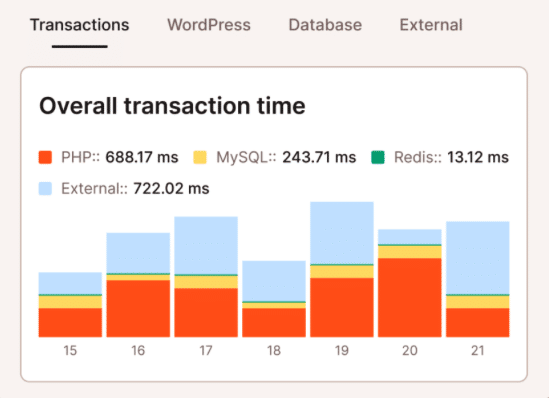
The developer can recreate that slow, 12-product cart on a WordPress staging site using a wholesale test account. They know what the discount should be, so they can check the revised calculation without touching live orders. Comparing speed takes a little more care. If staging uses different caching settings or has fewer resources than production, the timings won’t give them a reliable comparison.
“Can you give me access?” shouldn’t be the first message you receive when a colleague covers support. MyKinsta’s user management lets you give them staging access ahead of time, with production access reserved for whoever deploys the fix. If that colleague regularly works across your client sites, you can assign a company-level role instead of arranging access for each site separately.
When several stores use your discount extension, site labels make those installations easier to find. You can pull up the group when a fix needs testing, then consult each store’s project record for its pricing rules. The label needs to follow what’s actually on the site, though. A store that no longer uses the extension shouldn’t keep appearing in that list.
Where to invest first
“Still waiting for staging access” can sit in a ticket for half a day while a checkout fix waits for testing. If that comment keeps appearing in your recent tickets, you have a specific problem to solve. The developers covering those stores need accounts that let them do the work without waiting for the account owner to come back online.
Someone on your team trying their own login will tell you more than a list of assigned permissions. They might reach the dashboard and still lack access to the environment they need. Finding that out between tickets gives you time to sort it out without a client waiting.
“Run the usual checkout test” assumes your colleague knows the store as well as the person who writes the discount code. They may have no idea which account qualifies for wholesale pricing. Including that account reference beside a link to the discount rule saves them from waiting for the author to reply.
“I’m signed in. What should the cart total be?” A comment like that on the next ticket shows where team members still need help. The expected amount should be put beside the account reference while you answer. Otherwise, whoever handles checkout next week might ask you the same thing. Again.
Make the next site easier to support
Back at the two agencies, both developers have AI-generated test drafts ready by ten. The team with the documented checkout exception can put its draft to use. The other still needs an answer from someone in a meeting.
Those small advantages become more valuable as AI helps your team prepare more work. They let you use the extra output without sending every question to the same person.
Choose one recurring delay and remove it. Then give the next developer enough information to benefit from the fix. Kinsta’s managed WordPress hosting gives your team a familiar place to investigate and test changes as your client portfolio grows.
The post AI didn’t replace operations. It made good operations more valuable appeared first on Kinsta®.