Over the past 18 months, the focus on bot traffic has shifted from crawling and indexing to its impact on your server’s core performance, your hosting bill, and your ability to serve real customers.
We know this because we analyzed more than 10 billion requests across Kinsta-managed infrastructure, and what we found wasn’t an attack story. It was a resource story.
“From an infrastructure perspective, there’s no such thing as ‘just bot traffic,'” says Daniel Pataki, CTO at Kinsta. “Every request is real work. At scale, inefficient crawling stops being a traffic problem and becomes a resource problem.”
This article explains why that shift happened, what it actually costs WordPress site owners, and how the storyline needs to change.
The old model no longer works
Traditional bot management was built around a simple premise: block the bad ones and let the good ones through. For years, that was enough. Googlebot crawled your pages, indexed your content, and moved on. Malicious bots tried to break into your login page. Two very different problems, two very different solutions.
What neither model accounted for was a third category: automated traffic that isn’t malicious or blocked but is causing measurable damage to your site’s performance at scale.
AI crawlers, which are bots designed not just to index pages for search results, but to ingest content for model training, retrieval-augmented generation, and real-time user queries, operate at a fundamentally different scale than anything that came before. GPTBot alone grew 305% between May 2024 and May 2025. At the start of 2025, roughly one in 200 web visits was an AI bot. By the end of the year, that ratio had moved to one in 31.
By late 2025, AI crawlers accounted for 4.2% of all HTML requests on Cloudflare’s network, a figure that swung from 2.4% in early April to 6.4% in late June, nearly tripling within a year.
These crawlers are persistent and frequent, and they don’t behave like traditional search engine bots. Many generate large volumes of requests to uncached, dynamic endpoints, which gives your server “real work.”
What “real work” means for a WordPress Site
This is where the infrastructure problem becomes clear, and it’s a story that gets lost in most analyses of bot traffic.
When a visitor loads a cached page on a WordPress site, your server does very little. It returns a prebuilt HTML file, just as it would serve an image or a CSS file. The origin server barely notices. That’s the whole point of caching.
But a significant portion of requests on a real WordPress site and on WooCommerce stores in particular can’t be served from cache. These requests include:
- Cart and checkout endpoints (
?add-to-cart=,/cart,/checkout) - Filtered product pages with URL parameters
- Search queries
- AJAX-powered interactions (wishlist adds, live price updates, dynamic popups)
- Session-based pages that require the server to validate or create a user context
When a bot hits these endpoints, here’s what actually happens on your server:
- A PHP thread is reserved. Every dynamic request on WordPress occupies one PHP thread for the full duration of processing, typically 200–500ms, longer if the page is complex. That thread is unavailable for any other request until the job is finished. Your hosting plan has a fixed number of them.
- Your database runs a query. Dynamic pages query your database on every single load. Under normal human traffic, this is manageable. Under sustained bot load hitting uncached paths, the database executes queries constantly. If bots hit unique URL variations that result in no cache hits, each one triggers its own query chain.
- Session overhead is created. Cart and checkout pages create or validate sessions even for bots that never convert. This adds processing overhead across every one of those requests.
- PHP threads exhaust. When all available PHP threads are occupied, legitimate visitors don’t get served immediately, so their requests queue. If the queue fills, they start seeing slow page loads, stalled checkouts, and 504 errors. To a real customer trying to complete a purchase, your site appears broken.
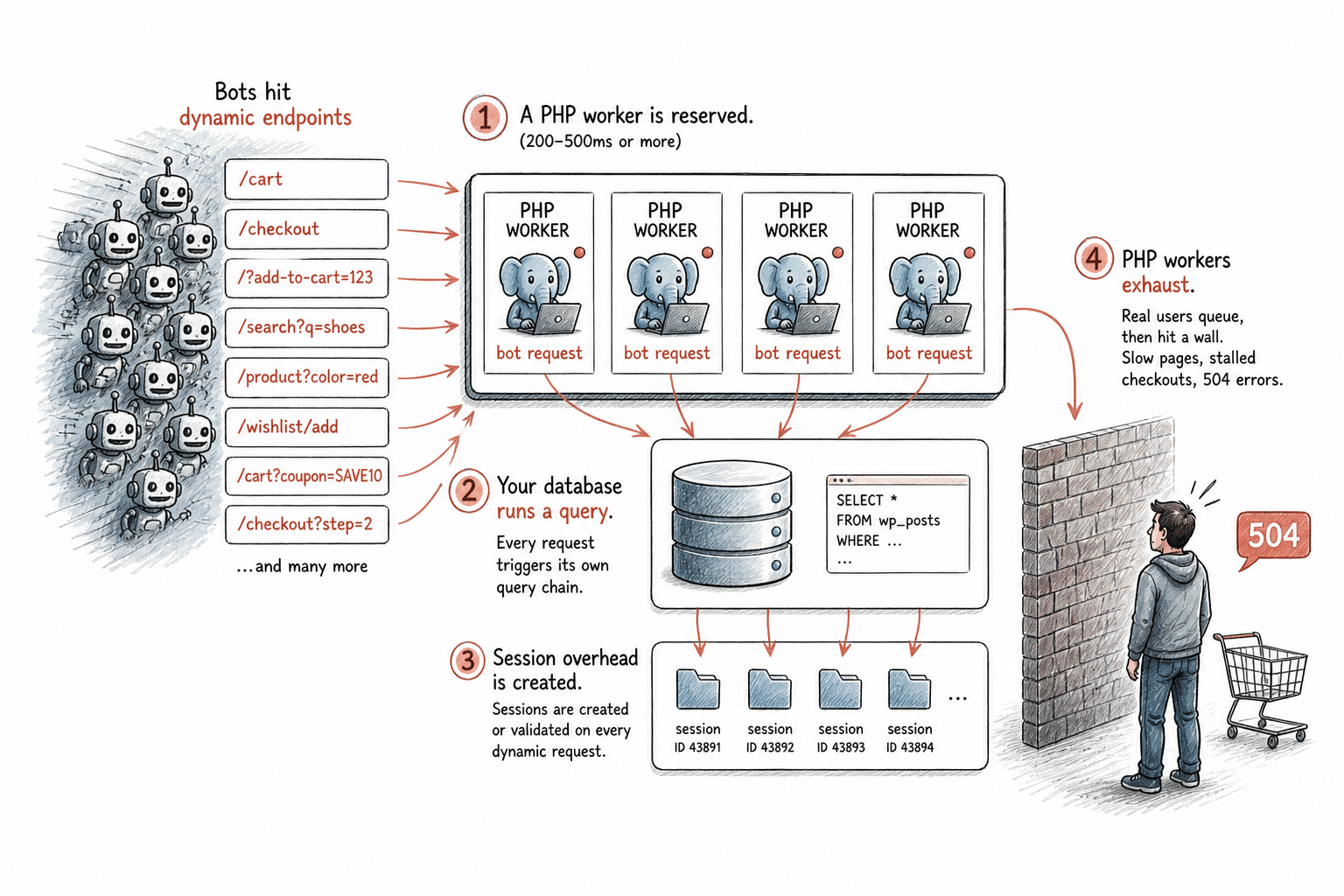
This is the mechanism by which bot traffic becomes an infrastructure problem. It isn’t theoretical. It’s the specific chain of events that happens when automated requests flood dynamic endpoints on a live WordPress site.
What Kinsta’s infrastructure data actually shows
The abstract becomes concrete when you look at real-world data from the infrastructure we manage at scale.
One data point we found particularly striking is that a single bot (ClaudeBot) generated 3.75 million add-to-cart requests within a 24-hour window. That’s roughly one request every 23 milliseconds (all day, all night), each treated by the server as a new request because cart endpoints are inherently dynamic.
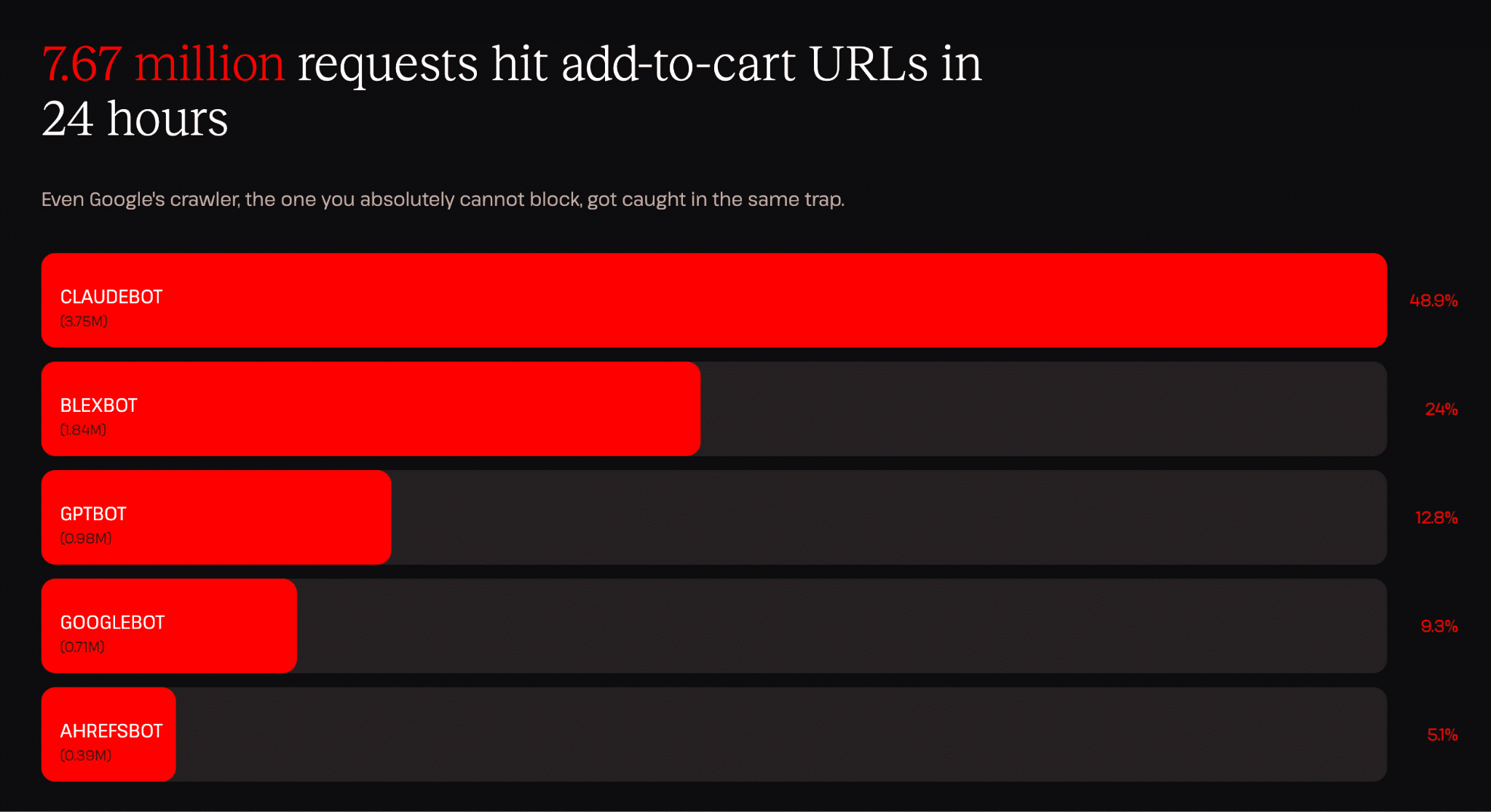
To put that in context: add-to-cart requests are among the most expensive endpoints a WooCommerce store has. They create sessions, run queries, and update cart state. Each one is real work. The 3.75 million requests we saw from a single source in one day is the kind of traffic pattern that can take a site offline.
A second data point underscores how persistent these patterns can be: one misbehaving loop pattern generated 550 million requests across 30 days, enough traffic to justify its own dedicated mitigation rule in our infrastructure. This is not a DDoS attack or a malware campaign, but a bot stuck in a crawling loop, repeatedly requesting URLs it has already seen.
These aren’t edge cases. They’re patterns we observe across our platform.
The loop problem: bots aren’t attacking, they’re stuck
One of the most underappreciated aspects of the current bot traffic problem is that most of what causes infrastructure damage isn’t malicious at all. It’s inefficient automation at scale.
Modern websites, especially e-commerce stores, generate slightly different URLs for essentially the same page:
- A product with a color filter appended
- A cart page with a session token
- A category view with a sort order parameter
To a human, these are all “the same page.” To a bot following URLs, each one looks like a brand new page to crawl.
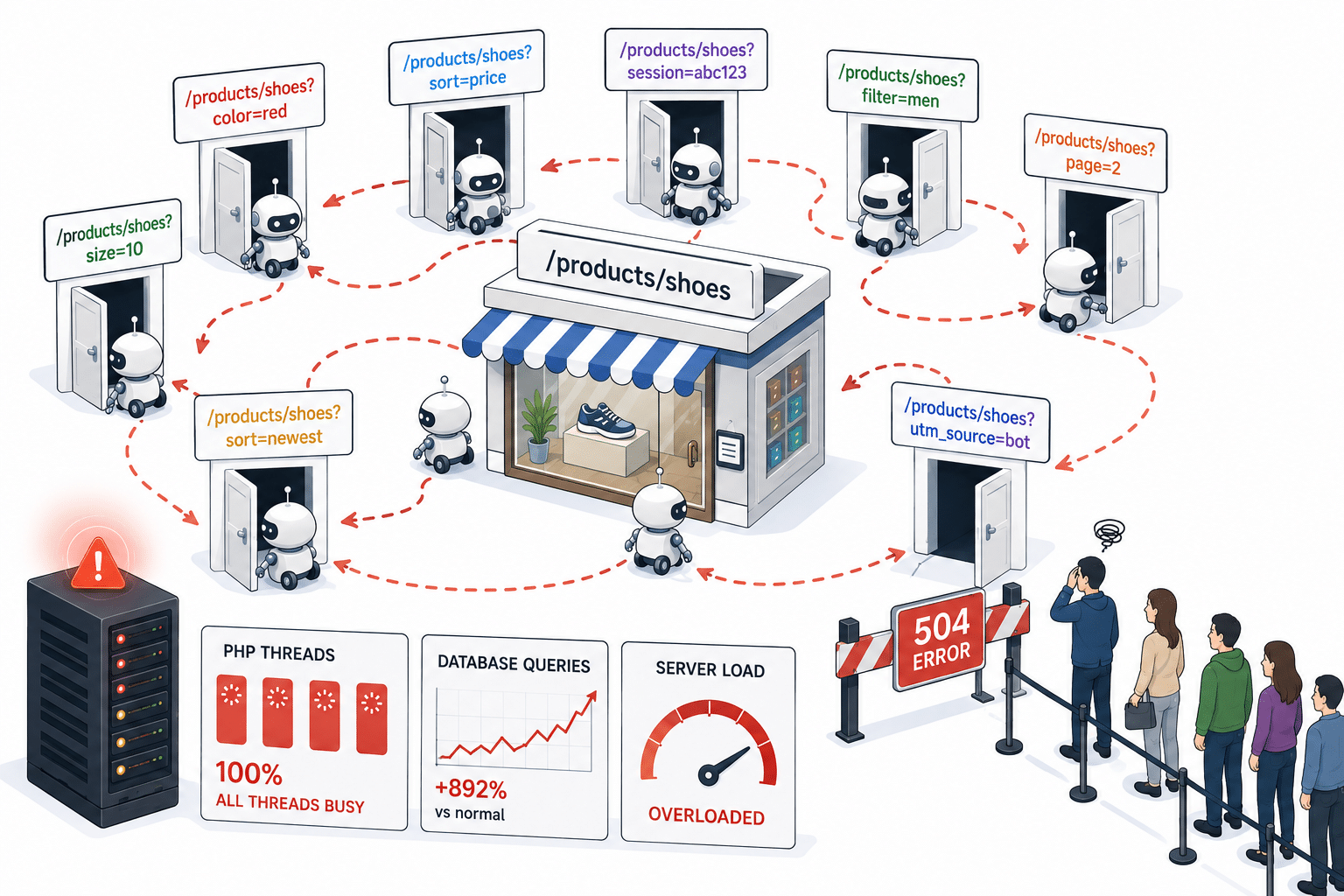
So the bot follows the first link. That page generates another URL variation, which the bot follows. Then another. Then another. It has no mechanism to recognize that it’s traveling in circles, and some of these loops ran undetected on monitored infrastructure for multiple days before mitigation rules caught them.
In the AI & bot traffic report we recently published, David Belson, formerly Head of Data Insights at Cloudflare, shared, “There’s the person who didn’t know what the hell they were doing yesterday, but vibe coded a bot today and let it loose. They’re not even bothering to check robots.txt.”
This behavior isn’t always coming from rogue actors. It’s coming from AI crawler systems that weren’t designed with awareness of faceted navigation, URL parameter sprawl, or session-generated URLs, which are standard features on modern WordPress sites.
Google itself explicitly identifies faceted navigation and parameter-based URLs as a source of crawl inefficiency, noting that bots can explore near-infinite variations of the same page.
Your server bill is now a bot management problem
Until recently, many hosting plans were sized around visit counts, which worked reasonably well as a proxy for real human usage. The assumption was that visits roughly correlated with people engaging with your site.
That assumption has broken down.
Automated traffic has inflated visit counts in a way that has very little to do with actual business activity. Bot requests can generate visit counts without generating corresponding engagement, conversions, or revenue. Site owners were receiving overage notices on visit-based plans driven by bot activity they couldn’t control and hadn’t invited.
This was evident enough as a systemic pattern that Kinsta introduced bandwidth-based hosting plans in direct response to a category of sites whose visit metrics had begun to diverge significantly from their actual resource consumption. If a site’s visits were growing but bandwidth wasn’t keeping pace, that was almost always a bot signal. Switching to a bandwidth model effectively decoupled billing from a metric that bots had learned to inflate.
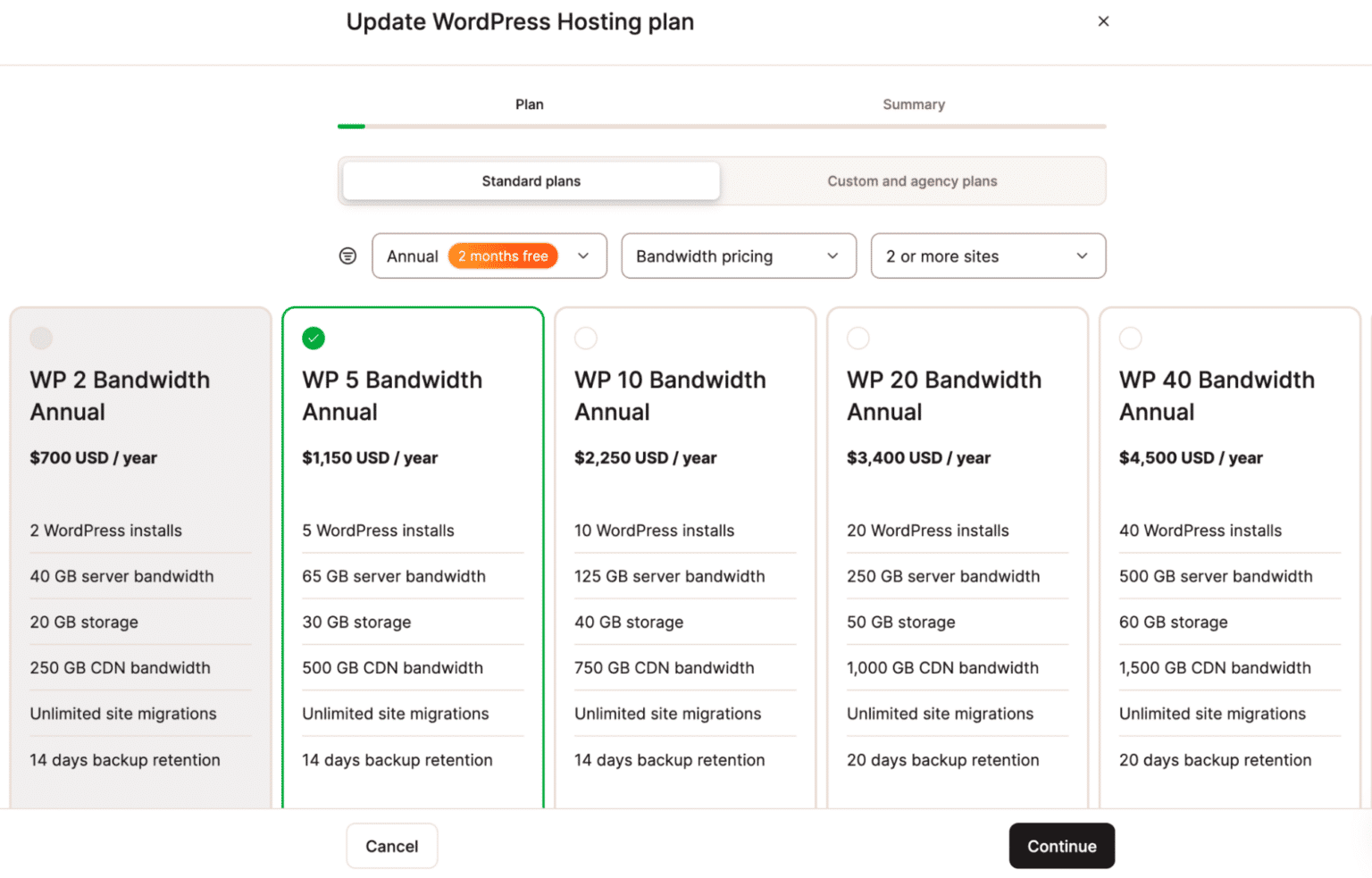
The billing problem is measurable and fixable. The harder problem is that most site owners don’t realize any of this is happening because their dashboards don’t show the full picture.
What your analytics are (and aren’t) telling you
One consequence of bot traffic operating at this scale is that standard analytics have become unreliable narrators of your site’s real performance.
If your visit counts are rising but revenue, time on page, and bounce behavior aren’t moving in proportion, bots are likely part of the story. If your server is showing performance degradation that doesn’t correlate with traffic spikes you’d expect from content or marketing activity, bot traffic to uncached endpoints is worth investigating.
Kinsta automatically filters known bot user agents from analytics and plan usage calculations. But automated traffic that closely resembles human behavior may still appear in your metrics.
The patterns to watch for:
- Repeated requests to the same URL types, especially parameter-heavy or session-based paths
- Traffic spikes at times that don’t correlate with any publishing, promotional, or seasonal activity
- Server performance degradation (higher TTFB, PHP thread exhaustion errors) during periods of elevated traffic that don’t correspond to real-world events
- Visit counts growing faster than bandwidth, conversions, or engagement metrics
None of these is definitive on its own, but any combination warrants investigation before attributing the numbers to business growth.
Why this is a harder problem than it looks
The most common instinct when confronted with bot traffic data is to block everything. Others might allow everything, because “AI is the future.”
Neither works!
Blocking indiscriminately means blocking verified crawlers, including Googlebot, whose crawl coverage determines whether your content appears in search results at all. It means blocking AI discovery bots that may be surfacing your content in conversational search results, AI-powered recommendations, or answer engines. For a WooCommerce store or a content publisher, that’s a meaningful distribution cost.
Letting everything through means accepting infrastructure costs that don’t generate any return. And for the dynamic endpoints that bots tend to hit hardest, those costs aren’t marginal. They accumulate and compound, especially under sustained automated load.
The actual answer lies somewhere in between, and it requires understanding the differences between traffic categories rather than treating all bots as a single class.
As Cristian Lopez, Managing Editor at HostingAdvice, shared in the report, “The misconception is thinking bot traffic is a simple ‘block or allow’ problem. In reality, it’s about policy, visibility, and economic control.”
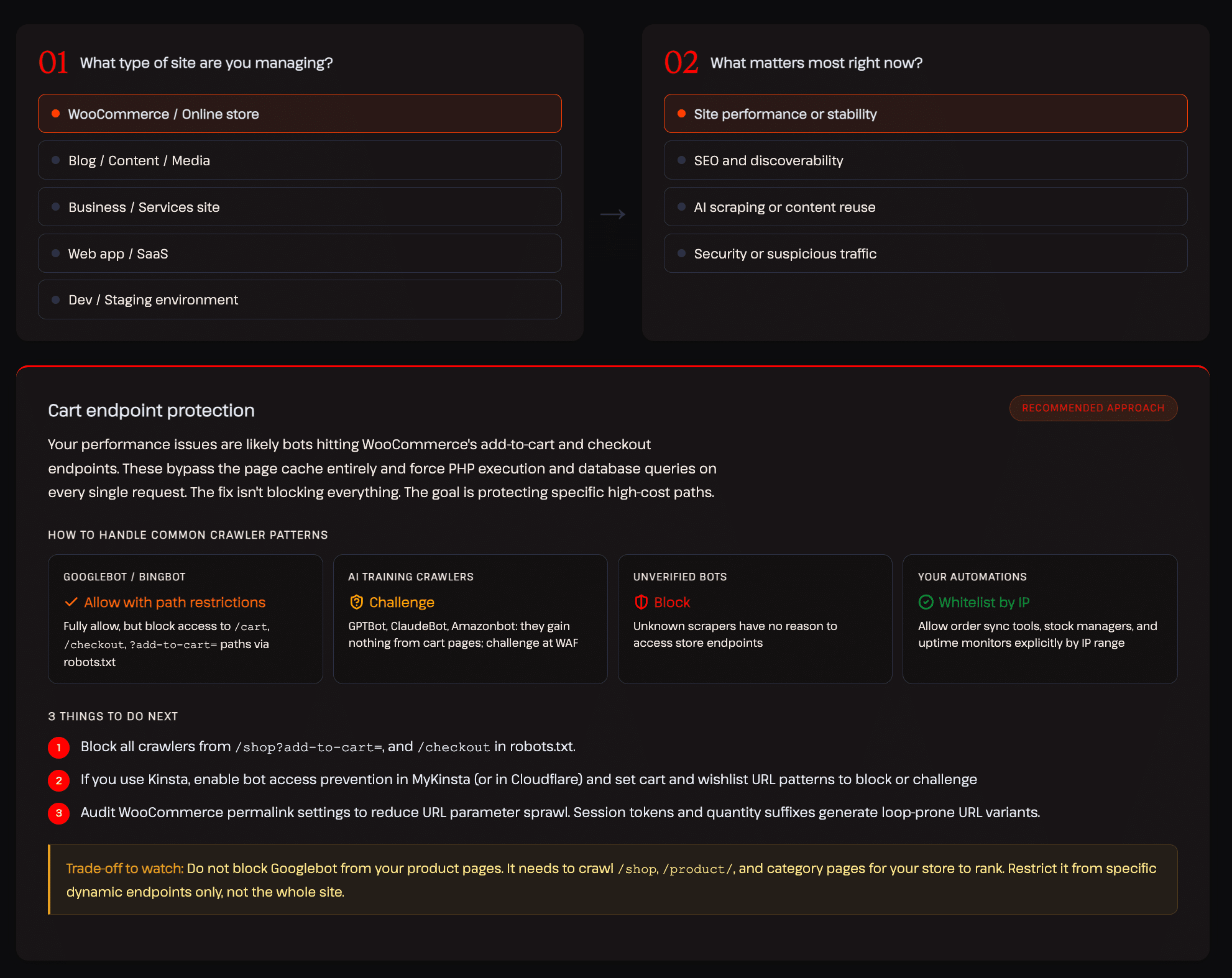
Verified bots, including Googlebot, Bing, and legitimate monitoring tools, should generally be allowed, with possible path restrictions on endpoints that have no crawl value (your checkout page contributes nothing to your search rankings). Unverified bots with no identifying information or purpose warrant more scrutiny. AI training crawlers that generate high request volumes to dynamic endpoints represent a specific category that may warrant blocking or rate limiting, depending on your site type and priorities.
In our AI & bot traffic report, we built an interactive decision framework that walks through the right approach for different site types. The example below shows the recommended configuration for a WooCommerce store focused on site performance and stability:
That kind of nuanced, category-aware control is exactly what most existing tools don’t give you.
The Kinsta bot protection approach
What we built with Kinsta’s bot protection was designed specifically around the infrastructure challenges described above.
The system classifies traffic into categories such as verified bots, likely humans, likely bots, automated traffic, and malicious traffic, and allows you to set protection levels that match your site’s actual needs.
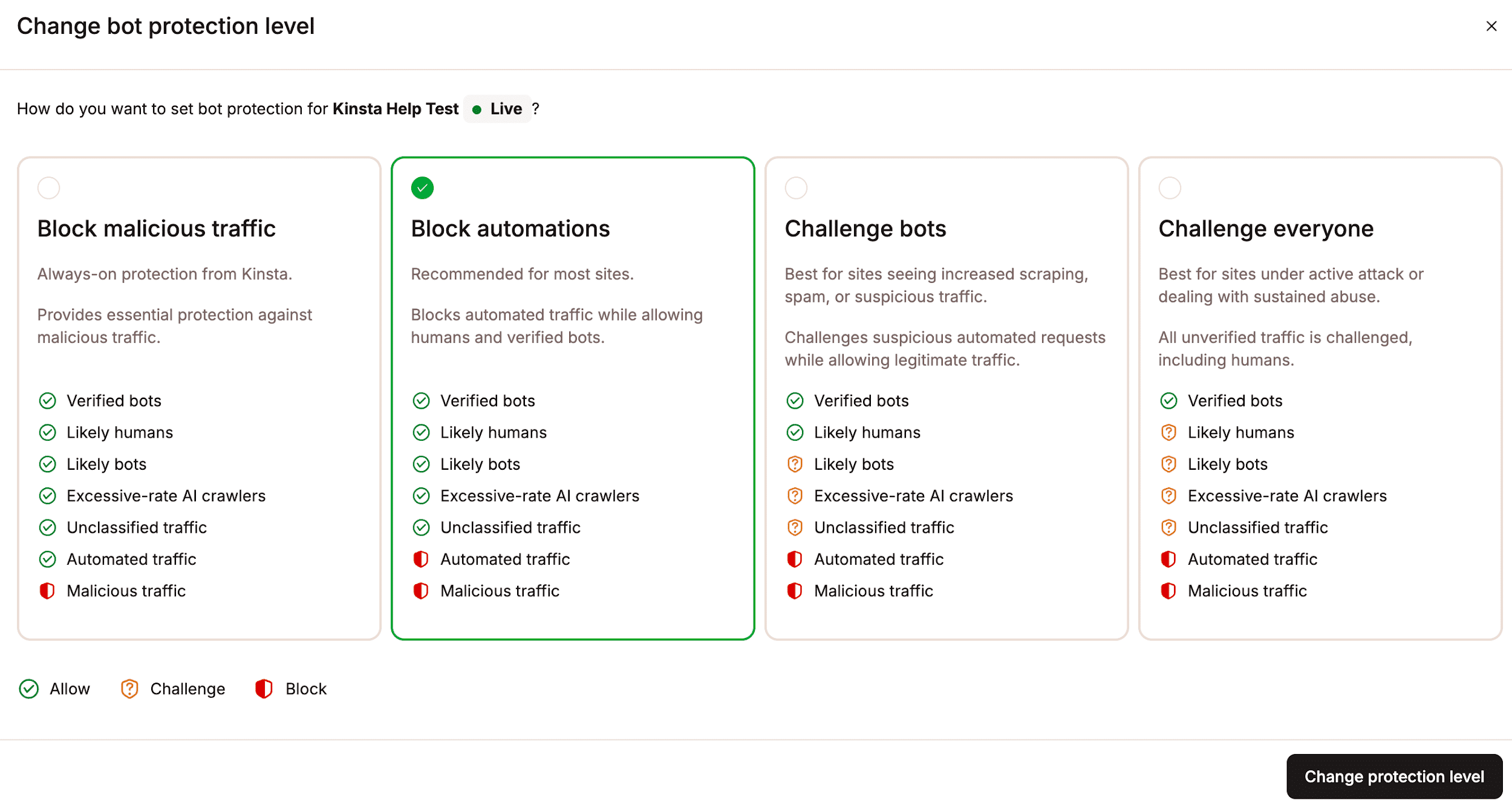
The levels aren’t binary. “Block automations” targets confirmed automated traffic while leaving verified bots untouched. “Challenge bots” adds a verification step for unverified automation without disrupting legitimate visitors. “Challenge everyone” is available for periods of acute traffic pressure but comes with the trade-offs you’d expect.
Critically, the tool is built on Cloudflare’s enterprise-level bot scoring, a real-time machine-learning classification that assigns every visitor a score from one to 99 based on behavioral signals, not just user-agent strings. This matters because user agent matching alone is increasingly ineffective, as 12.9% of AI bots now ignore robots.txt directives, up from 3.3% just one quarter earlier. Behavioral classification catches what user-agent-based rules miss.
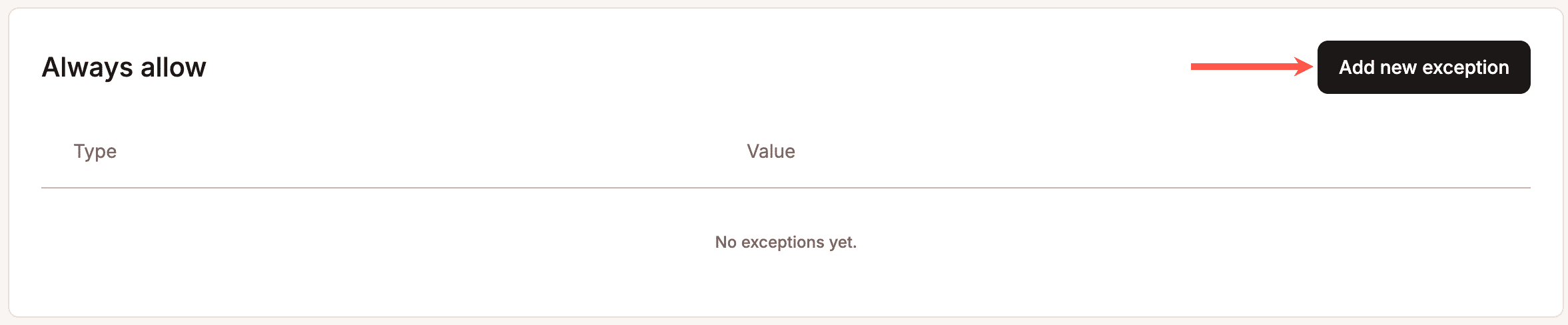
There’s also an Always Allow exception system for trusted integrations, monitoring services, and business-critical automations that shouldn’t be caught by protection rules, because over-blocking is a real cost too, particularly for WooCommerce stores that rely on automated order sync, payment gateway integrations, or uptime monitors.
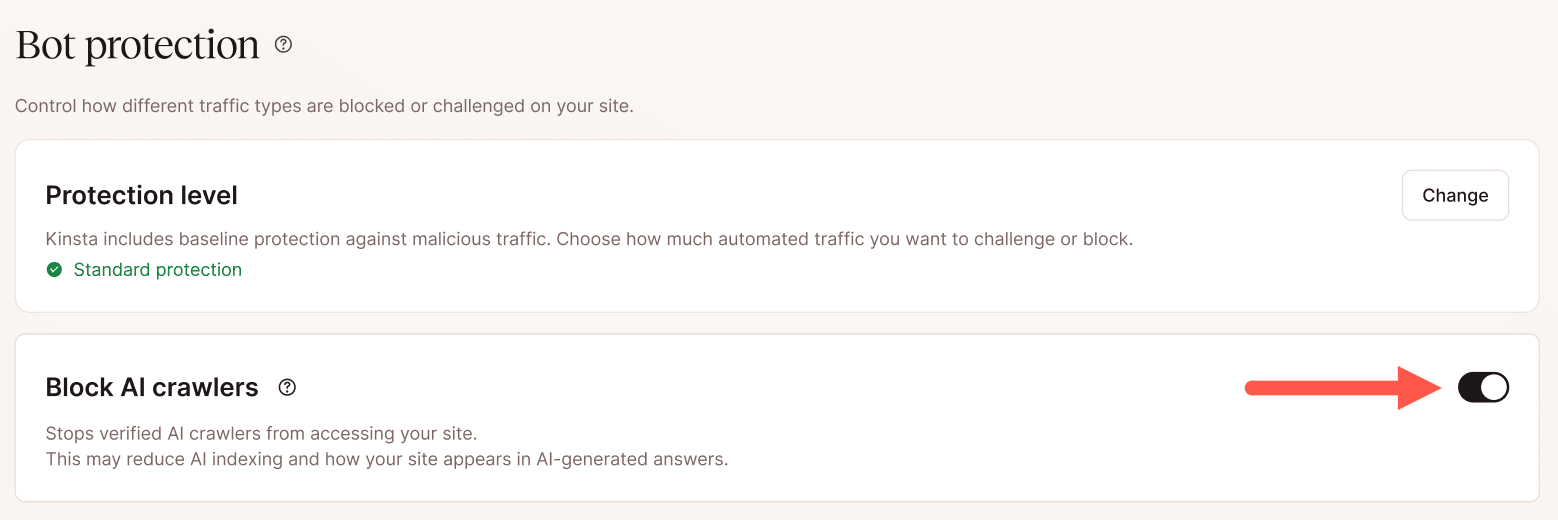
The AI crawler blocking toggle specifically targets AI training bots without affecting search engine crawlers like Googlebot or Bingbot. For sites that have identified AI crawler activity as a performance driver, this is a single-step mitigation that doesn’t require configuring individual rules.
Knowing the tool exists is one thing. Knowing when and how to use it is another.
What to do if bot traffic is your problem
If you’re seeing the patterns described above, here’s a practical starting point, ordered by impact:
First: verify the source. Use the Request breakdown chart in MyKinsta’s bot protection view to understand how traffic to your site is classified.
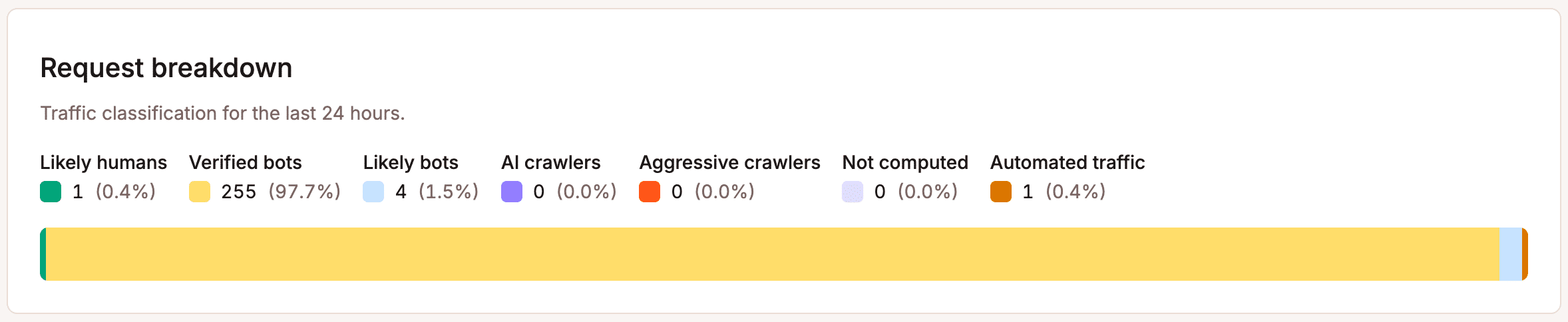
If a substantial portion is automated or unverified, that’s your signal to act. Don’t skip this step, as making protection changes without knowing what you’re protecting against leads to misconfigurations.
Second: match protection level to site type. A WooCommerce store has different priorities than a content publication, which has different priorities than a staging environment. Blocking automated traffic and challenging likely bots makes sense for a store with dynamic endpoints. A content site might prioritize allowing AI discovery bots while blocking AI training crawlers. A staging environment should be fully locked down regardless.
Third: protect the expensive paths first. Before applying broad protection rules, consider whether your highest-cost endpoints, like cart, checkout, and AJAX handlers, are accessible to crawlers that have no reason to be there. Blocking known bot user agents from /cart and ?add-to-cart= via robots.txt is a starting point; enforcing that at the WAF level (not just signaling it) is what actually prevents the load.
Fourth: monitor, then adjust. Bot traffic patterns shift faster than most site owners realize. GPTBot’s traffic share grew threefold within a single year. Setting protection rules once and ignoring them is not a strategy. The bot protection results chart in MyKinsta tracks what’s being blocked, challenged, and allowed over time.
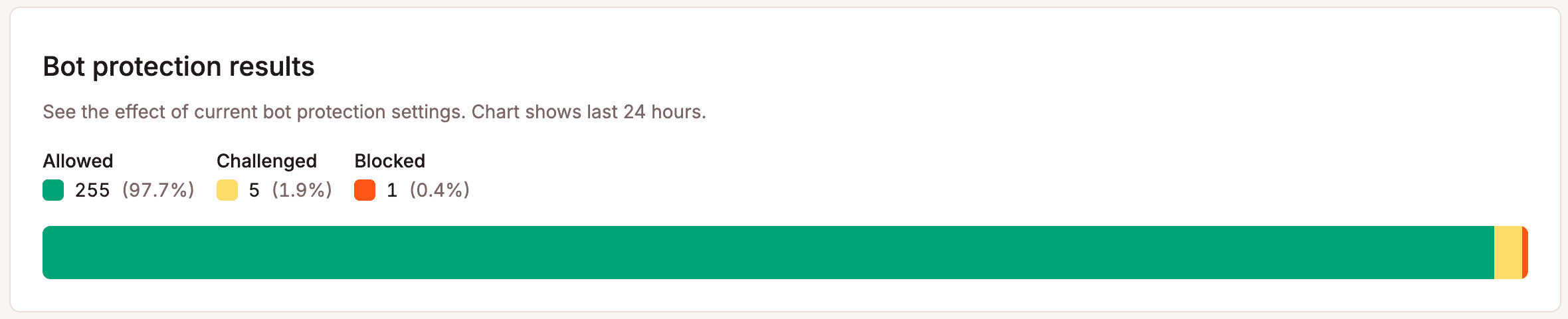
This data should inform how you tune your settings.
If bots are generating visit-count overages on a visit-based plan, reviewing Kinsta’s bandwidth-based hosting plans may also be worth doing in parallel. Switching to a bandwidth-based plan doesn’t solve the underlying bot problem, but it can better reflect the actual infrastructure cost of your traffic mix, which is often substantially lower than visit counts suggest.
The bigger picture: this problem will get harder
Agentic traffic is already appearing in infrastructure logs. Google has announced a dedicated user agent for when its AI agents interact with sites. These are automated systems that click links, fill out forms, and make requests that increasingly resemble human session behavior.
The signals that currently work for bot classification, such as user agent strings, request frequency, and behavioral scoring, become harder to apply cleanly as the line between automated and human interaction continues to blur.
Most site owners can’t keep up with that on their own. Bot behavior evolves faster than manual rules can adapt. What worked three months ago may already be insufficient. And the cost of getting it wrong in server resources, in billing overages, in real customers hitting 504 errors during checkout is real and immediate.
This is the case for infrastructure that handles it for you. Kinsta’s platform blocks 15–20% of malicious traffic before it ever reaches your site, sits on Cloudflare’s enterprise network, and gives you bot protection controls that adapt to how your site actually behaves. As bot traffic continues to evolve, the difference between a hosting platform that treats this as an infrastructure problem and one that treats it as a footnote will become increasingly hard to ignore.
The sites that navigate this well won’t be the ones that blocked the most. They’ll be the ones running on infrastructure built to handle bots best.
The post Why bot traffic is now an infrastructure problem (not just an SEO problem) appeared first on Kinsta®.