We’ve all heard of the sacred rule in modern web development, the rule never to be broken. The rule of “Never block the main thread.”
You almost can’t miss it as a web developer; it’s in almost every performance guide, and to be fair, it is good advice. We all know the browser’s main thread is single-threaded, meaning it can only do one thing at a time.
Plus, as we know, the main thread isn’t ours alone; we share it with the browser’s rendering engine, input handlers, and other critical tasks. As a result, the less time we hold onto the main thread, the more responsive an app feels. That leads us to share tasks with background workers as we’ve convinced ourselves there should be a hard line between the UI and any computation, and that line shouldn’t be crossed.
And that is what a “recommended” architecture looks like.
But I dare say that sometimes**, moving the data to a worker is slower than just letting the main thread do the work.
I found this out a few months ago while building a Chrome extension with screenshotting features called Fastary. I kept finding a latency of about 2 to 3 seconds in all my testing, even after using an Offscreen Document (a background process in Chrome extensions) to handle the canvas operations. A screenshot task should feel instant without lag, after all.
It is quite ironic that by reflex, we move work away from the main thread to avoid freezing the UI, but sometimes the act of moving that work (e.g., serializing, copying, and deserializing) can also freeze the UI. And sometimes the recommended approach of letting the background do the work can be slower than just doing the work on the main thread.
Let’s talk about that.
The Architecture Of Browser Context IsolationTo put things in perspective, let’s understand why we isolate browser contexts and how they communicate with each other, with emphasis on the communication part.
A browser is more than a single environment. Different environments are running at the same time, each having its own memory space, what it can access, and rules:
- The main thread is what we are most familiar with; this is where JavaScript logic runs, where the DOM lives, where styles get rendered, and where users interact.
- The Web Workers are separate threads that can also execute JavaScript without DOM access. We mostly use this for heavy data tasks.
- The Service Workers are network-related proxies in charge of intercepting network requests and can even run when the page is closed.
- And then there are Chrome extension contexts, where we have background service workers, content scripts, and Offscreen Documents (the relevant ones for this article).
Each one of these is isolated from the others. A web worker or background script lives in a different memory space from the main thread. They cannot just reach and read each other’s variables or logic, and this is known as the “shared-nothing” architecture.
How do these isolated environments communicate? They explicitly message each other back and forth using APIs, like postMessage().
The Structured Clone Algorithm
postMessage() tells the browser to take a piece of data and deliver it to the context that requested it. But to do this, the browser relies on the Structured Clone Algorithm (SCA).
You’re probably familiar with JSON.stringify(). SCA is similar, but much stronger and smarter. In its simplest form, SCA is a deep, recursive copy operation, i.e., cloning. It walks through the entire data structure it is given, clones every single value, serializes it into a transportable format, ships those bytes to the target contexts, and then reconstructs the original object on the receiving side.
SCA is fast, or maybe fast-ish... For a small regular config object like {theme: "dark"}, it is imperceptible; you don’t even notice it. The story changes, however, when dealing with heavy data because the SCA is a synchronous blocking O(n) operation, i.e., the cost increases linearly with the size of your data.
Let’s put that into perspective. A user clicks a button, and internally, an 8MB image payload is sent to a background worker for processing. When you call postMessage(), the main thread must immediately stop what it is doing to run this serialization and copying process.
So, if the time it takes to pack, ship, unpack the data, and go back to the start is longer than the time to just process the data on the main thread, why not do that instead?What About Transferable Objects?
I’m sure some of you are already thinking, “Why not just use Transferable objects?” And that is a valid point. Let’s talk about that.
Developers who really pursue ultra-high-performance web apps usually use Transferable objects (e.g., ArrayBuffer, ImageBitmap, or MessagePort) to bypass the Structured Clone Algorithm. This is because when you transfer an object, you’re not making a copy (like SCM). Instead, the browser switches ownership of the data from one context to another.
The browser performs a hand-off whereby the sending context loses access to the data instantly, and the receiving context takes full control. It is actually insanely fast. According to Chrome Developers’ benchmark, transferring a massive 32MB ArrayBuffer can take under 7ms, compared to about 300ms when cloning with SCM. That’s a 43x speed boost.
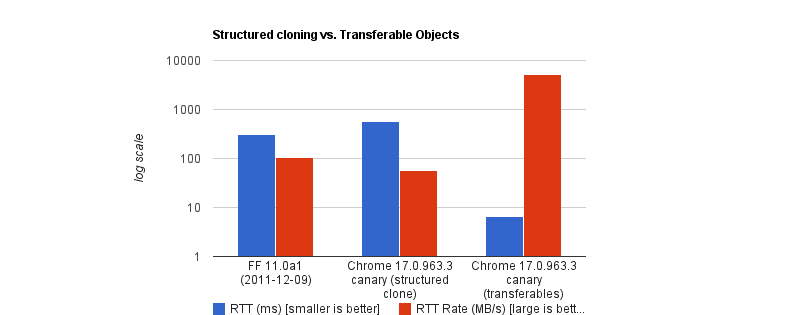
But like all good things, there are downsides. To name a few:
- You lose it once you send it.
If the UI still needs that data (like to show an image preview), you can’t access it anymore. - Not all data is transferable.
A plain JS object is not. A Blob is not. Even a Base64 string is not. - API limitations.
In the context of browser extensions, Chrome’s internal messaging (chrome.runtime.sendMessage) traditionally forces everything through JSON serialization.
So, as far as my screenshot extension went, Transferable objects were not an option.
Why We Isolate Contexts AnywayWhy do we even bother isolating contexts at all? Why not just leave it all to the main thread?
Offloading long-running CPU tasks to a background thread is absolutely the right thing to do. The browser needs to paint a new frame every 16.6ms to keep things fluid; that means any task that takes >50ms is generally considered “long”. Offloading to the background is absolutely the right thing to do.
The issue, however, is that we’ve turned this “never block the main thread” into an absolute rule, without asking is this task expensive to process or expensive to move?
I have come to realize now that the rule is less “never block the main thread” than “never block the main thread for too long.”
When The Right Architecture Is The Wrong ArchitectureMy goal with the Fastary extension was to make it feel like a native app, running as smoothly and instantly as you would expect a native app to.
As you already know, I took the recommended approach to use the Offscreen Document to handle DOM work in the background. But to my surprise, that took a different turn.
The Offscreen Document API is a clear winner. You create a hidden, undisplayed document that runs entirely in the background. It has a DOM and supports Canvas. For example, if I want to crop a screenshot, stitch multiple screenshots together, perform heavy image manipulation, or add a watermark, Offscreen Document was made for that.
Turns out that was not the best approach. This was my architecture:
- The background Service Worker captures a screenshot with
chrome.tabs.captureVisibleTab(), which returns a Base64-encoded data URL string. - The background Service Worker uses
chrome.runtime.sendMessage()to ship this image payload to the Offscreen Document. - The Offscreen Document receives the image, loads it into an
<img>element, then draws it onto a canvas before it applies the user’s crop coordinates, encodes the result, and sends the processed image back to the background worker.
But when I tested it, the screenshot didn’t feel instant. As I said earlier, there was a consistent 2–3 second lag.
I figured out that when captureVisibleTab() takes a screenshot, it returns a Base64 URL string, and on a standard 1080p screen, that string could be approximately 1MB or more, depending on how detailed the image is. It gets even more interesting on modern Retina displays (e.g., MacBooks) as they tend to automatically double the image’s size by default.
Keep in mind that since the image payload could be doubled and extension messaging relies on JSON serialization (as of this writing), we potentially deal with massive synchronous communication that costs an entire round trip.
The image string data is JSON-serialized at least twice: once when going into the Offscreen Document and once coming back out with the processed results to the background worker. The actual image processing (cropping) done inside the Offscreen Document was fast, no doubt, but I can’t say the same about the transfer overhead.
The Retina High-DPI Problem
As if the latency itself wasn’t enough, I noticed a rather subtle bug — which, now that I think of it, was more of my ignorance. After a screenshot was taken, the crop result was completely off in a way that either weirdly scaled the image or resulted in incorrect coordinates.
It turns out that when a user selects a region to crop, the content script gets the box coordinates using getBoundingClientRect(), which is measured in CSS pixels; this is what the DOM uses. But when the screenshot is captured natively in Chrome, the browser doesn’t crop it automatically; it instead uses the physical hardware pixels to get the full screen capture. And the browser uses devicePixelRatio (DPR) to know how many physical pixels should represent one CSS pixel. Basically, if a user on a Retinal display (DPR = 2) highlights an area of 400x300 CSS pixels, the actual captured image area is 800x600 physical pixels.
Note: One CSS pixel is equal to 1 physical pixel (DPR of 1) on a standard monitor. On a Mac Retina display or a modern 4K monitor, however, the DPR is usually 2 or 3.
For an accurate crop, I needed to apply these two different measurement systems with the right DPR, i.e., scale the crop coordinates by the DPR. But remember, Offscreen Documents have no physical display. Processing any image would have a default DPR equal to 1. To fix this, I would have to capture the exact devicePixelRatio from the active tab, serialize it, pass it alongside the image payload, and manually do the scaling math inside the Offscreen Document. The complexity starts to compound.
What if I broke the golden rule and did the work on the main thread instead?
Working On The Main ThreadSome developers will argue that UI tasks are the only things that should run on the main thread, but I don’t fully agree with that. Personally, I believe that user explicitly-invoked actions that need immediate results can sometimes get a solid pass to run on the main thread, provided the work is incredibly fast (e.g., 1s).
That’s what I did: scrap out the Offscreen Document and reengineer the logic. Instead of:
Background → [serialize] → Offscreen Document → [serialize] → Background → Content Script…I decided to run the whole image processing in the active tab:
- The background Service Worker captures the screen and gets the Base64 string (same as before).
- The background sends the payload directly to the content script in the active tab using
chrome.scripting.executeScript(). - The content script (running on the main thread) receives the payload, draws it to a canvas, performs the crop using the correct DPR value, and copies the result to the clipboard.
// Background Script
const screenshotUrl = await chrome.tabs.captureVisibleTab(undefined, { format: "png" });

// Inject the processing function into the active tab as a content script
await chrome.scripting.executeScript({
  target: { tabId: activeTab.id },
  func: processAndCopyImage,
  args: [{ base64Image: screenshotUrl, cropData: userSelection }]
});
This approach completely clears out multiple context hops and round trips that JSON serialization requires. The only cross-context transfer involves sending the data URL from the background to the content script.
The Retina DPI issue essentially solved itself, as the content script runs directly inside the real, active browser tab because it knows the monitor’s real devicePixelRatio.
But there’s an elephant in the room that you may have noticed.
Sure, the image is now processed on the main thread, and the background manipulates the canvas in the active tab. I could technically be blocking the main thread. That’s where I amended the “no blocking the main thread” rule to “no blocking the main thread for too long.” In this specific case, at least, blocking the main thread for a task the user requests for approximately one second is justifiable. It works conversely as well: maybe don’t isolate processes if the data transfer cost is greater than the processing cost.
Conclusion: When To Isolate And When Not ToI’ve boiled it down to a mental model that depends on whether the task is:
1. Compute-Heavy Tasks (CPU-Bound)
These are tasks where the primary cost is computation and not the size of the data itself. These are tasks where most of the time is spent on doing calculations or heavy transformations, e.g., image compression, audio profiling, physics simulation, etc.
The transfer cost for these tasks is minuscule compared to the actual work.
2. Data-Heavy Tasks (Data-Bound)
These tasks are the exact opposite. These tasks are only expensive because of the size. The processing time is almost insignificant, but the data is expensive to transport, e.g., image cropping, filtering an array, shallow copy, etc.
In my specific case, offloading the task to the background falls mostly into negative-sum efficiency. If we are talking about moving megabytes of data to perform a 50ms operation, there is no benefit to offloading it to the background.
Perhaps we can think of it like this:
Total Time = Serialization Cost
  + Transit
  + Background Processing Time
  + Deserialization Cost
Looking at this, if the “background processing time” is the most dominant task in your operation, then isolation is the clear winner. But if serialization, plus deserialization, plus transit exceeds that cost, then there’s no need to isolate things.
And if you can’t figure out if the task is CPU-heavy or data-heavy, it certainly doesn’t hurt to measure it, for example, using performance.mark() and performance.measure() around postMessage calls to profile the transfer cost.