AI agents don’t just answer questions anymore. They can carry out tasks.
On a WordPress site, this could involve setting up a staging environment, updating a plugin, running checks, pushing an approved change live, clearing the cache, and keeping a record of what happened. Currently,, a developer or site manager might carry out each of those steps themselves. Agents can now take over more routine tasks while still leaving people in charge of major decisions.
It doesn’t mean an AI system should have unrestricted access to production; rather, teams determine what an agent can access, what actions it can carry out, and when it requires human approval.
It is a shift from manual processes to supervised automation, where humans set the rules and software takes on more repetitive tasks.
AI agents are moving from answers to actions
Most teams already use AI as a helper. It can answer a question, draft something, or help troubleshoot a problem, but someone still has to take that information and do the actual work.
Agents change that relationship. Instead of stopping at a recommendation, an agent can use connected tools to carry out a task. It can gather information, make decisions within defined rules, take an approved action, and report the result.
Gartner expects this model to spread quickly. By 2028, it predicts that more than half of enterprises will favor platforms that take responsibility for workflow results over tools that simply assist employees. In Gartner’s view, people increasingly supervise systems that execute work on their behalf rather than handle every procedural step themselves.
WordPress already has some of the pieces required for that shift. The Abilities API gives WordPress core, plugins, and themes a standard way to define actions along with their inputs, outputs, and permissions. The WordPress MCP Adapter can then expose selected abilities as tools that AI agents can discover and execute.
That doesn’t suddenly make every WordPress task a good candidate for automation. It does change what’s technically possible. AI can move beyond telling a developer how to perform a task and, when given the right access, perform parts of that task itself.
The more useful question now is: Which website tasks should teams actually let agents handle?
What agent-driven website operations could look like
The easiest way to picture agent-driven website operations is to look at work WordPress teams already handle every day. Maintenance, deployments, troubleshooting, and administrative work all include steps that agents can take on.
Maintenance and updates
Plugin and theme maintenance is a natural place to use agents. Rather than checking each site by hand, a team can have an agent find available updates, sort out which ones need attention, apply approved changes, run checks, and report back on what happened.
The agent could also move the work into staging when an update carries more risk. If a test fails, it could flag the problem or roll back the change instead of continuing through the workflow.
Parts of this model already exist without AI. Kinsta Automatic Updates creates a backup before an update, applies the plugin or theme update, compares screenshots before and after the change, and automatically restores the backup when visual regression testing detects a problem.
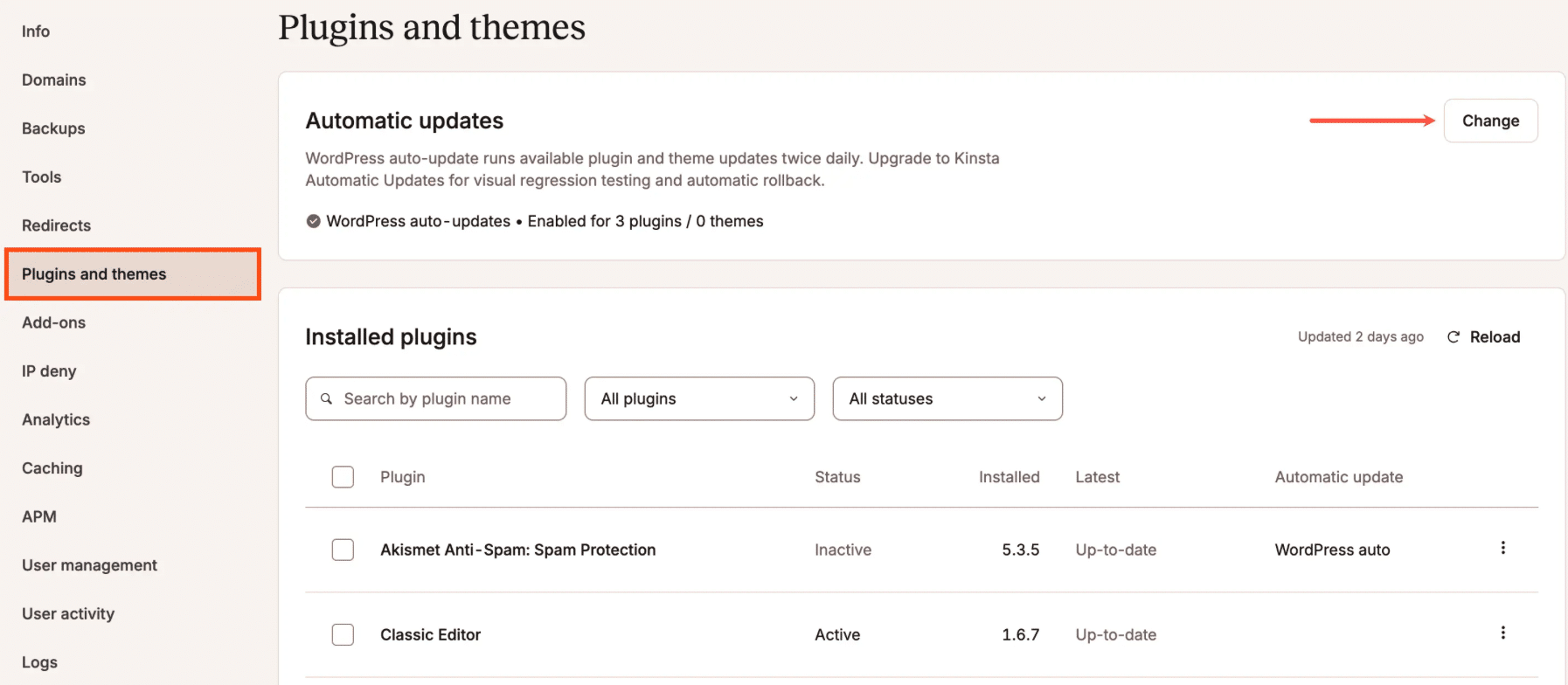
An agent can add another layer by coordinating these types of automated tasks across sites and deciding when a person needs to step in.
Staging and deployments
Deployments involve another series of repeatable steps. An agent could create a staging environment, apply an approved change, trigger tests, collect the results, and prepare the update for production. A developer could then review the outcome and approve the final deployment.
Kinsta’s API already exposes several of those hosting operations programmatically. Teams can create staging environments, push staging to live, clear site and CDN caches, update plugins and themes, and check the status of longer-running operations through the API.
That creates room for workflows where the agent handles routine execution while the developer keeps control of the production decision.
Performance and troubleshooting
When a site slows down or starts throwing errors, the first step is usually figuring out what changed. That often means checking analytics, logs, recent updates, cache behavior, and resource usage before the cause becomes clear.
An agent can collect much of that evidence first.
For example, the Kinsta API can return site analytics and server logs programmatically. Its analytics endpoints expose information including visits, bandwidth, response codes, locations, and other traffic data, while its log endpoints can retrieve error, access, and cache-performance records.
An agent could bring those signals together, identify likely causes, and either recommend the next step or carry out a predefined low-risk action.
Content and administrative work
The same model extends into WordPress itself. Agents could prepare content updates, pull information for client reports, update predefined settings, or handle repetitive administrative tasks exposed through WordPress tools and APIs.
None of this requires an agent to control an entire website. The more immediate opportunity comes from turning individual manual steps into tasks software can execute, then deciding how much authority to give it over each one.
Automation doesn’t have to mean full autonomy
Teams don’t have to choose between manual work and handing an AI agent unrestricted control. They can increase automation in stages and keep people involved wherever the risk calls for it.
One practical way to think about this is as a progression:
- Observe: The agent reads information and reports what it finds.
- Recommend: It suggests the next step based on predefined rules or available data.
- Prepare: It performs reversible work, such as creating a staging environment or applying a change there.
- Act with approval: It carries out the next step only after a person reviews and approves it.
- Act within policy: It handles low-risk tasks independently as long as they stay within clearly defined limits.
Some tasks are easier to automate than others. An agent can pull analytics or flag outdated plugins with very little risk. Pushing code live or restoring a backup is different, and most teams will want someone to review those actions first.
Agents don’t have to handle every situation perfectly to be useful. They just need a specific job to do and a clear point where they stop and hand the work back to a person.
For most teams, that means starting with routine tasks and keeping people involved when the stakes are higher. As those workflows become more reliable, teams can decide where it makes sense to give agents more room to act on their own.
More automation requires better guardrails
An AI tool that gives you a bad answer creates one kind of problem. An agent that makes a bad production change creates another.
As agents take on more work, access controls matter more.
Give each agent only the access it needs. If its job is to pull analytics, it doesn’t need to touch DNS. If it’s checking plugin updates, it doesn’t need permission to delete a site or manage users. The less access it has, the less can go wrong.
Teams should also keep approval requirements around higher-risk actions. That might include production deployments, backup restores, DNS changes, user management, or anything else that could cause downtime, data loss, or an unexpected client-facing change.
You also need a way to undo a change if something goes wrong. Staging, backups, testing, and rollback procedures all help with that. As agents take on more of the work, those safeguards become even more important.
The goal isn’t to assume an agent will get everything right. It’s to make mistakes easy to catch and, when possible, easy to reverse.
When agents do the work, teams need to see what happened
Automation doesn’t reduce the need for visibility. It increases it.
When a developer changes things by hand, they generally know both what they have altered and why. But when an agent begins carrying out steps in the workflow, the team needs a clear account of what happened without having to reconstruct the sequence afterward.
At a minimum, they should be able to answer:
- What action ran?
- What triggered it?
- Which site or environment did it affect?
- Did it succeed?
- What changed?
- Can the team reverse it?
Kinsta already provides several sources teams can use to answer those questions. The MyKinsta Activity Log records actions at the account and site level, including who initiated them, when they ran, and whether they succeeded. Kinsta also exposes company activity logs through its API, including filters for the site, user, category, and API key involved.
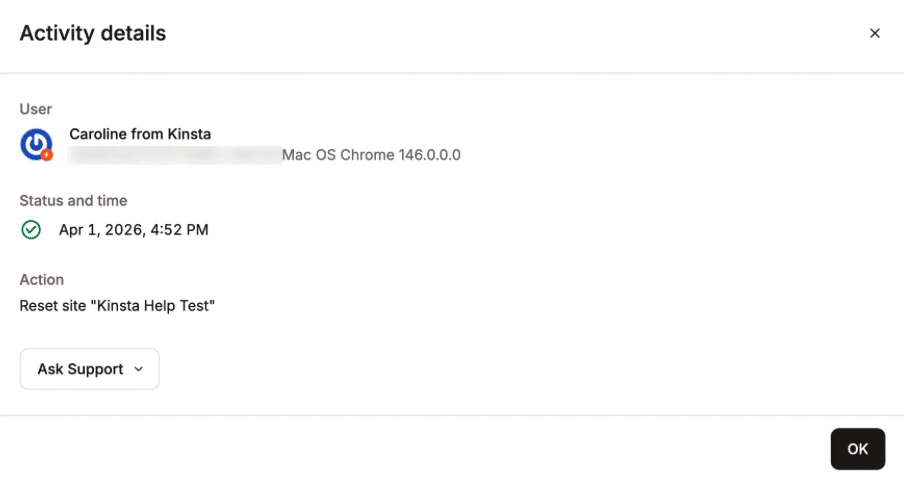
Analytics and logs provide another layer of context. The Kinsta API can return site analytics, backups, and site logs programmatically, which gives automated workflows access to the same operational evidence teams use during investigations.
For deeper performance problems, Kinsta APM breaks down slow WordPress requests across PHP processes, database queries, plugins, hooks, and external calls.
People may click fewer buttons as agents take on more execution. They still need enough information to understand what those agents did, spot problems quickly, and step in when something goes wrong.
APIs become the execution layer for website operations
Agents need a reliable way to interact with the systems they manage. For website operations, that usually means APIs and other structured interfaces.
The workflow starts to look less like: Human > dashboard > action
And more like: Human > agent > API or tool > action > result > human review
The dashboard matters, but it doesn’t have to be the only place where work happens.
Kinsta’s REST API already supports a broad range of WordPress hosting operations. Teams can use it to create and clone sites, create staging environments, push staging to live, update plugins and themes, clear caches, manage backups, retrieve analytics and logs, work with domains, and change several environment settings.
That means agents don’t need a separate way to handle every hosting task. They can use the same APIs developers already rely on for scripts, integrations, and other automation.
Kinsta has also demonstrated this model with an MCP server connected to the Kinsta API. In the example, an AI assistant can list WordPress sites, inspect environments, and clear cache through tools exposed by the MCP server. The team controls which tools the agent can access, and the example keeps actions behind explicit approval.
That distinction matters. APIs provide the execution layer, while the agent provides a more flexible way to decide when and how to use it.
As more website operations become available programmatically, teams won’t need to open a dashboard and click through every step themselves. They can hand defined pieces of that work to agents while keeping MyKinsta available for direct management, review, and intervention.
How this changes the agency delivery model
For agencies, the biggest change may not be technical. It may be operational.
Agents can take routine maintenance and reporting off an agency’s plate. That doesn’t remove the need for developers or account teams. It changes where they spend their time.
Instead of handling every step manually, teams can focus more on designing the workflow around the work. They decide which tasks an agent can handle, what conditions it needs to meet, when it should stop, and when a person needs to step in.
That leaves teams with more time for work that still needs human judgment, including:
- Deciding how workflows should run,
- Stepping in when automation hits something unexpected,
- Making architecture and performance calls,
- Managing security and access,
- Troubleshooting harder problems,
- And working with clients on priorities and next steps.
Automation changes the business side of maintenance, too. Agencies often spend a lot of time on work clients rarely see, from routine updates to checks and reporting. As agents take over more of those tasks, agencies can put more of their attention on results, response times, reliability, and the overall health of the sites they manage.
That also gives teams more room to grow. An agency can manage more sites without adding the same amount of repetitive work for every new client. Developers get more time for harder problems, while the agency can provide more proactive support without piling on the same level of day-to-day maintenance work.
That raises a useful question for agencies: What happens to your delivery model when maintaining twice as many sites no longer requires twice as much repetitive work?
The answer probably isn’t fewer people doing the same jobs. It’s people spending less time on routine execution and more time on the decisions, exceptions, and client work that still require judgment.
Prepare for agents without betting on the future
You don’t need to overhaul your workflow to prepare for agent-driven operations. Start with the processes your team already uses and look for places where you can make the steps clearer, safer, and easier to automate.
From there:
- Sort tasks by risk. Decide which jobs an agent can handle on its own and which ones still need a person to sign off.
- Check for API access. Tasks are much easier to automate when the system already exposes them programmatically.
- Tighten up staging and rollback. Give agents somewhere safe to make changes and a reliable way to undo them.
- Map out permissions. Know which accounts, credentials, and systems control each part of the workflow.
- Keep good records. Make sure your team can see what changed, when it changed, and where to look if something breaks.
- Start with one narrow task. Let an agent flag outdated plugins across a group of sites before you ask it to handle an entire maintenance workflow.
None of this depends on agents reaching full autonomy. These changes make website operations easier to automate and manage today while giving teams more options as agent-driven workflows mature.
Kinsta already supports many of those workflows through its API and existing automation tools, so teams don’t have to wait for fully autonomous agents to start building around this model.
Humans still run the operation
AI agents can take over more of the routine work, but people still own the outcome.
Developers still make architecture decisions. Agencies still know what matters to each client. Technical teams still decide when to step in, how much risk they’re willing to accept, and what to do when a workflow goes off course.
What changes is how much day-to-day work someone has to do by hand. Teams still make the decisions and remain responsible for the result, but software can handle more of what happens in between.
Your next website operator may be an AI agent. The bigger change is that your team may spend less time operating the website and more time deciding how those operations should work.
The post What happens when AI agents become your new website operators? appeared first on Kinsta®.