Do you know HTML, CSS, or JavaScript? A decade ago, not knowing how to code meant that building a website was expensive or time-consuming. Today, AI website builders have changed that. With just a few prompts, you can generate a professional-looking website in minutes.
In this guide, we’ll show you how to build a website with AI from writing your first prompt to customizing and publishing your site. By the end, you’ll have everything you need to go from prompt to publish.
Key Takeaways
- AI website builders enable anyone to create professional websites quickly and easily without coding skills
- These builders generate websites based on user prompts, allowing for customization and visual editing post-generation
- The article outlines steps to successfully build a website with AI, including prerequisites, choosing a builder, and utilizing Bluehost’s AI tools
- Key advantages of AI website builders include faster launches, smarter context awareness, and a focus on no-code solutions
- To get the best results, focus on context in your prompts, maintain the human touch, and ensure accessibility in your website design
What is an AI website builder?
Think of an AI website builder as a generative AI platform that’s purpose-built for creating websites. Instead of writing paragraphs or generating images, it generates complete web pages based on your prompts. You simply describe the type of website you want, your business, preferred style, and goals, and the AI creates a professional-looking first draft in minutes without writing a single line of code.
What an AI website builder isn’t just another automation tool. It doesn’t simply schedule blog posts, perform website maintenance, or automate repetitive tasks. Nor is it a traditional drag-and-drop builder that leaves you staring at a blank canvas. Instead, it uses generative AI to create layouts, content, images, and design suggestions, while still giving you the freedom to fine-tune everything through a visual editor before you publish.
How does an AI website builder work?
At its core, an AI website builder works much like any other generative AI tool. You provide instructions, the AI interprets them, and generates a result. The difference is that instead of producing text or images, it creates the foundation of a website. Most AI website builders follow the same three-step process:
Step 1: Prompt and response
Everything starts with a prompt. You’ll answer a few questions or describe the website you want to build, including your industry, target audience, brand style, and the pages you need. The more context you provide, the better the AI can tailor the website to your goals.
Step 2: Automated generation
Once it understands your requirements, the AI generates your website automatically. It creates page layouts, writes placeholder or draft copy, suggests relevant images, and organizes your content into a cohesive website structure, all within a few minutes.
Step 3: Visual editing
The generated website isn’t set in stone. After the first draft is ready, you can customize it using a visual editor. You can update text, swap images, rearrange sections, change colors and fonts, and refine the design until it matches your brand. Think of AI as creating the first draft, while you remain in control of the final website.
AI in web designing: how it is changing the game
AI website builders are no longer a niche trend; they’re quickly becoming a mainstream way to build websites. According to market research by Custom Market Insights, the global AI-powered website builder market is expected to grow from $3.41 billion in 2026 to $14.78 billion by 2035, reflecting the rising demand for faster, no-code website creation.
Another report by Precedence Research estimates the market could grow even faster, reaching $17.4 billion by 2035. Businesses of all sizes are increasingly turning to AI to reduce development time, lower costs, and get online sooner.
This growth isn’t happening by accident. AI website builders address many challenges, from technical complexity to long development timelines. By combining generative AI with intuitive editing tools, they make it easier for anyone to create a professional-looking website.
Here are some of the biggest advantages driving their adoption.
No-code “vibe coding”
The biggest advantage of building a website with AI is that you don’t need to know how to code. Instead of writing HTML, CSS, or JavaScript, you simply describe what you want in plain English. The AI interprets your prompts and generates a website that matches your requirements. This approach, often called vibe coding, lets you focus on your ideas while the AI handles the heavy lifting.
Faster launches with less effort
Traditional website projects can take days or even weeks, especially if you’re starting from scratch. AI website builders dramatically shorten that timeline by generating layouts, copy, images, and page structures in minutes. Instead of spending hours creating the first version of your website, you can start with an AI-generated draft and spend your time refining it, helping you launch sooner without sacrificing quality.
Smarter context awareness
Modern AI website builders don’t just generate generic templates. They use the context you provide, such as your industry, business goals, target audience, and design preferences, to create a more relevant starting point. For example, a restaurant website will look and function differently from a photographer’s portfolio or an online store. The more information you provide, the better the AI can tailor the website to your needs.
These benefits make AI website builders an excellent starting point, but getting the best results still depends on how you use them. It all begins with choosing the right platform and providing the AI with the right information.
How to build a website with AI: Step by step
AI website builders make creating a website much easier, but the process still follows the same basic principles as traditional website creation. You’ll need a domain, hosting, and a platform that brings everything together. Once those pieces are in place, AI can handle much of the heavy lifting.
Here’s how to build a website with AI, step by step.
Step 1: Get the prerequisites
Before you start building a website with AI, make sure you have a few essentials in place. Think of them as the foundation of your website. The list of prerequisites includes the following:
Domain name
Your domain name is the address of your website on the internet. It’s what visitors type into their browser to find your site (for example, yourbusiness.com). A memorable, brand-friendly domain helps people recognize your business and makes your website easier to share.
If you haven’t registered one yet, you can search for and purchase a domain through Bluehost Domains, which lets you manage your domain and website from one place.
Web hosting
Every website needs a place to store its files, images, and content. That’s where web hosting comes in. A hosting provider keeps your website online and delivers it to visitors whenever they access it. Choosing reliable hosting is important because it affects your website’s speed, uptime, and security.
If you’re looking for a beginner-friendly option, Bluehost Web Hosting combines hosting with WordPress support and AI-powered website creation, making it easy to get started.
SSL certificate
An SSL certificate encrypts the connection between your website and its visitors, helping protect sensitive information such as login credentials and contact form submissions. It also enables HTTPS, which browsers recognize as a secure connection. Today, SSL isn’t just a security best practice; it’s an expectation for any professional website.
Website builder
A website builder is the tool you’ll use to create and customize your website. Traditional website builders rely on drag-and-drop editing, while AI website builders go a step further by generating layouts, content, and images based on your prompts. They help you move from a blank page to a working website much faster.
Content management system (CMS)
A CMS lets you manage your website after it goes live. Whether you’re publishing blog posts, updating pages, uploading images, or installing new features, a CMS makes these tasks easy without requiring coding knowledge.
For most websites, WordPress is the best choice. It’s flexible, beginner-friendly, and powers a significant portion of the web. More importantly, it gives you complete ownership of your content, thousands of themes and plugins to extend your site, and the freedom to scale from a simple portfolio to a full ecommerce store as your needs grow.
Step 2: Choosing an AI website builder
Now comes the most important decision: choosing the right AI website builder. While there are plenty of options available, the best ones do more than generate a website. They also simplify everything that comes before and after it.
This is where the Bluehost AI Website Builder stands out. Instead of making you juggle multiple services, it brings everything together in one place, helping you go from idea to a live website with minimal setup.
Here’s why you should go with Bluehost AI:
Everything you need in one place
One of the biggest advantages of the Bluehost AI Website Builder is that it handles the essentials for you. Website creation, managed WordPress hosting, and domain registration are all available through a single platform, so you don’t have to switch between multiple providers or configure everything yourself. It’s a much simpler way to get online, especially if you’re building your first website.
Smarter prompts for better results
Most AI website builders ask for a short description and generate a website immediately. Bluehost goes a step further. Before creating your site, it asks a series of industry-specific questions to better understand your business, goals, and online audience. This additional context helps the AI generate a more relevant first draft, giving you less to edit later.
Generate and edit images with AI
Need to replace a hero image or create something unique for your website? Instead of searching through stock photo libraries, you can simply describe the image you want. The AI generates new images directly within the builder, making it easy to customize your website without leaving the platform.
Built with SEO in mind
A beautiful website is only useful if people can find it. Bluehost builds your website on WordPress and includes Yoast SEO Premium on paid plans, giving you access to industry-leading SEO tools from day one. That means you can optimize your pages, improve your content, and prepare your website for search engines as you build it, instead of treating SEO as an afterthought.
 Keep in mind:
An AI website builder can help you create and launch your website faster, but it can’t replace a thoughtful SEO strategy. While Yoast SEO Premium gives you powerful tools and guidance, it’s still up to you to create valuable content, optimize your pages, and build a website that serves both your audience and search engines.
Security and support you can rely on
Launching a website is just the beginning, so ongoing security and support matter just as much. Paid Bluehost plans include a free SSL certificate, malware scanning and removal, weekly backups, and a global CDN to help keep your website secure and performing well. If you ever get stuck, you can also reach WordPress experts 24/7 by chat or phone.
With the right AI website builder in place, you’re ready for the fun part: creating your website. Let’s walk through how to build your first AI-powered website with Bluehost.
Step 3: Getting started with Bluehost AI website builder
Getting started with the Bluehost AI Website Builder is surprisingly simple. Instead of worrying about technical setup, you answer a few questions about your business, choose your preferred style, and let AI create the first draft of your website. From there, you can customize every detail before publishing your site.
Here’s all you have to do:
3.1. Start your website
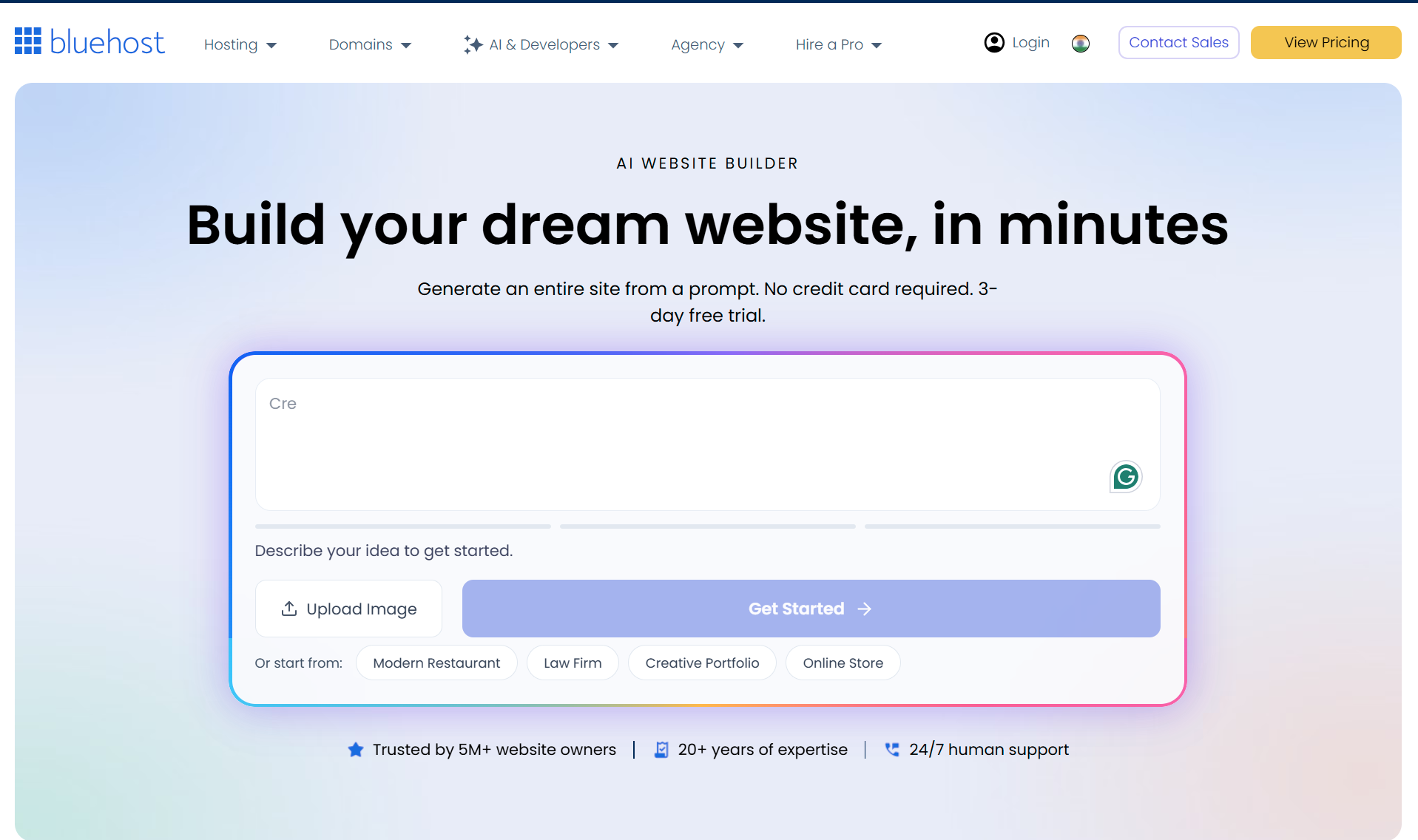
3.2. Customize your brand identity
Next, tell the builder a little more about your brand. Add your business name, choose your preferred color palette, specify your location, and select a design style that matches your vision. Once you’re happy with your selections, click Build My Site.
3.3. Create your Bluehost account
Before your website is generated, sign in to your existing Bluehost account or create a new one using your email address or a supported social login. This ensures your website is linked to your account and ready for the next steps.
3.4. Review and personalize your website
Within a few minutes, Bluehost generates the first draft of your website. Use the visual editor to make it your own. You can edit text, replace or generate new images with AI, adjust layouts, add or remove pages, change colors, and even ask AI to create additional sections. No coding is required.
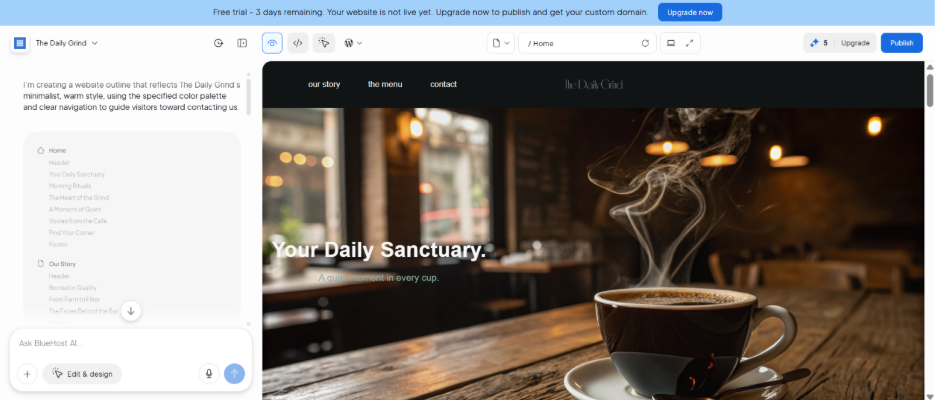
3.5. Choose your domain and publish
When you’re happy with your website, select one of the AI-suggested domain names or connect a domain you already own. Complete the checkout process, and Bluehost automatically configures your hosting, SSL certificate, security features, and WordPress installation. Your website is then ready to go live.
Do check out the help article for more information on the platform.
Best practices for building a website with AI
Congratulations! Your website is now live. But publishing it is only the beginning. To attract visitors, provide a great user experience, and improve your visibility in search results, you’ll need to continue refining your website.
Here are a few best practices to help you get the most out of your AI-generated website.
Focus on context, not keywords
AI website builders work best when they understand the bigger picture. Instead of giving short, keyword-focused prompts, describe your business, target audience, goals, products or services, and the tone you’d like your website to have. The more context you provide, the more relevant the generated website will be.
The same principle applies to your website content. Before creating pages or SEO-friendly blog posts, spend some time on keyword research to understand what your audience is searching for. Once you’ve identified the right topics, naturally incorporate your keywords into high-quality content that addresses your readers’ needs.
Don’t forget the human touch
AI can generate impressive layouts and content, but it doesn’t know your business the way you do. Review every page before publishing and personalize it with your brand voice, customer stories, original images, testimonials, and real-world expertise. These small details help build trust with your visitors and make your website stand out from countless AI-generated sites.
Create something unique and verify everything
AI is great at creating a solid first draft, but it often relies on patterns learned from existing websites. That means your design, messaging, or content may end up looking similar to countless others.
Before publishing, review every page carefully, verify the accuracy of AI-generated content, and add details that reflect your brand’s personality and expertise. Following SEO-friendly content best practices will also help you create pages that are both original and genuinely useful to your audience.
Test and optimize regularly
Before going live
Before making your website public, take a few minutes to review its technical SEO. Check that important pages are crawlable, verify that search engines aren’t being blocked by accident, and make sure your XML sitemap is available. If you’re using Yoast SEO, features like crawl optimization settings can help reduce unnecessary crawl activity while keeping important content accessible. It’s also worth manually reviewing your site’s metadata, internal links, and page structure to ensure everything is working as expected before launch.
Post going live
Your website shouldn’t remain the same after it goes live. Regularly review your pages, test them on different devices, fix broken links, update outdated information, and improve page performance. If you publish blog content, revisit older articles and optimize them over time. Small, consistent improvements can have a significant impact on user experience and search visibility, helping you drive more traffic to your website.
Also read: Website maintenance: Check and fix 404 error pages
Make your site accessible to everyone
A great website should be easy for everyone to use, including people with disabilities. Use descriptive alt text for images, maintain sufficient color contrast, structure your content with proper headings, and ensure your website is easy to navigate using a keyboard. If you’re using WordPress, there are several accessibility plugins that can help improve your site’s usability while supporting accessibility best practices.
Must read: The importance of accessibility in WordPress
Create valuable content
A well-designed website attracts visitors, but valuable content keeps them coming back. Whether you’re publishing blog posts, service pages, or product descriptions, focus on answering your audience’s questions and solving their problems. Following proven content SEO and blog SEO best practices will help your content perform better in search engines while providing a better experience for your readers.
Build smarter, launch faster
Building a website no longer has to mean learning to code, hiring a developer, or spending weeks piecing together different tools. AI website builders have made the process faster, more intuitive, and accessible than ever before. As you’ve seen throughout this guide, all it takes is the right platform, a clear vision, and a few thoughtful prompts to turn an idea into a live website.
As Sachin Puri, CEO of Bluehost, puts it, the real power of AI lies in removing complexity for users. That’s exactly what modern AI website builders are doing. They simplify the technical side of website creation so entrepreneurs, creators, and small businesses can focus on what matters most: building their brand and growing their online presence.
So, if you’ve been waiting for the right time to build your website with AI, this is it. Start with a prompt, personalize the result, and let your website grow alongside your business.
The post The complete guide to building a website with AI: From prompt to publish appeared first on Yoast.