By the end of the afternoon, you have a working WordPress plugin. With some help from AI, it sends form submissions to your client’s CRM and emails a confirmation. You show the client. They like it. Can it go live Friday?
You still need to know what happens when someone submits the same form twice, or the CRM stops answering. And who can change the plugin’s settings? So far, you only test it with your own admin account. Before you move on, a colleague needs enough context to troubleshoot it while you’re away.
That afternoon saves you time. It also leaves you with software your agency now needs to look after. As AI makes it easier to build, the review and maintenance work can take up more of the schedule than you expect.
We’ll look at where that work lands, what it means for your estimates, and how your processes and hosting setup can help you hold on to the time you save.
Faster production changes the workload
Some of the most useful AI assistance happens before a developer has much to show. A rough requirement becomes a draft function. A designer explores a layout without building every variation by hand. A writer gets past the blank page.
That can free up meaningful time. Developers who spend less of the morning writing generic copy or instructions have more room to investigate awkward compatibility issues, so long as the schedule leaves that room available.
In Google’s 2025 DORA research, more than 80% of respondents believed AI increased their productivity, and a positive relationship between AI adoption and delivery rate was also reported. However, this appeared alongside a negative relationship with delivery stability. These are just associations, of course, but they do show why faster output alone gives you an incomplete view of delivery.
With the CRM plugin, you can get a submission to appear in the client’s account fairly quickly. Then you try an email address that’s already in the CRM. Should the plugin update that contact, leave it alone, or create another record? The code needs to reflect how the sales team works, including what they expect when someone submits the form twice.
Sorting that out means you’ll need to talk with the client and run a few more tests. Leave room for both in your estimate. If you move the deadline forward by every hour AI saves on coding, you squeeze the work that tells you whether the feature is ready.
The work moves into review and integration
Try following a submission through as someone on the sales team. The new contact appears in the CRM, but there’s no record of whether that person agrees to follow-up emails. The plugin sends the data without an error, yet leaves out something the team needs before they can use it.
Use that goal to define what you expect to see in WordPress and the CRM. Then check the implementation against the actual site. An agency’s existing conventions may cover where settings live, how it stores credentials, which hooks it uses, and how it records errors. Following those conventions gives the next developer less to decipher.
A subscriber may never see the plugin’s settings page and still be able to send a request that changes those settings. As you review WordPress user roles, look beyond what each person sees in the dashboard. The code needs to check their permissions when it reads or changes information. Follow the data, too: what leaves the site, and do any private details end up in the logs?
For integrating forms, the review process involves the surrounding workflow, too:
- Confirm that each form field reaches the correct CRM field.
- Check whether another plugin already sends the same submission.
- Verify what happens when required information is missing.
- Make sure someone can find a failed submission without exposing private data.
AI can help identify possible gaps and draft tests for them. Give it the requirements and ask it to examine assumptions. Then verify the behavior independently. A test that repeats the implementation’s assumptions offers little reassurance.
Before handing over the feature, ask another developer to explain how it works and where they would investigate a failure. Any uncertainty gives you a useful place to improve the code or documentation. The objective is software your team understands well enough to own.
Easier creation gives agencies more to maintain
Say the client wants the same inquiry form on a second location’s website. It looks like a copy-and-paste job, except those leads need to go to a different sales rep. You duplicate the plugin and change the assignment. Both forms work. Now, when you fix a duplicate-contact bug in the original, you also need to remember the copy on the second site.
An internal script can become a maintenance commitment out of the blue. An account manager uses a CSV export you write to pull Friday’s unanswered inquiries from the CRM. The following Friday, they use it again. The script lives on your laptop, under your credentials, but the account manager now relies on it to prepare for the client call.
If your CRM token expires while you’re away, who’s responsible for the report? Someone else on the team needs to know where the script lives and how to supply a replacement token. They also need somewhere to check the error when the export comes back empty.
When you manage multiple WordPress sites, record the plugin version against each site, with a link to its code and the name of its maintainer. Give the export script an entry, too. For the two inquiry forms, you may only need one plugin with a configurable sales-rep ID. That gives you one place to fix the duplicate-contact bug, followed by a deployment to each site, without having to compare two copies for unrelated edits.
Revisit the experiments as well. Put a date in the calendar to check whether anyone still uses that export or reporting script. If it no longer has a purpose, retire it rather than carrying it through every update.
AI gives your team room to build more. Leave some room in the schedule to look after what stays.
A working demo still needs a release process
The client approves the CRM integration after watching one submission create one contact. That’s useful feedback. It doesn’t tell you what happens when an existing customer submits the form, two requests arrive together, or the CRM rejects the credentials.
A repeatable release process gives those situations a chance to surface before customers encounter them:
- Prepare a realistic test environment. Use a WordPress staging site with the relevant plugins, settings, and user roles. Use synthetic or appropriately sanitized records and a CRM test account so staging doesn’t contact real leads.
- Run the complete workflow. Submit the form as a visitor, inspect the resulting CRM record, and check the confirmation. Test existing contacts as well as new ones. Look for effects on other forms and scheduled work.
- Spend some time trying to break it in staging. Try a variety of things to break it, like submitting the form twice, leaving fields blank, and using credentials that no longer work. Make the CRM respond slowly, then try sending several submissions at once. When you get a failure, open the logs. Could someone who doesn’t know this code figure out what went wrong from what they find there?
- Work out how you’ll undo the change. Keep the code in version control and note any settings or database updates that need to go with it. You’ll need to know how to switch the feature off. If recovery involves a backup, check what it contains and which newer records a restore could overwrite.
- Leave time to check the live site. A test submission needs to be sent. Then, somebody will need to find it in the CRM and watch for errors afterward. You’ll need to agree on who takes that job before you deploy, along with when they should stop the rollout. A missing contact shouldn’t leave them wondering whether to wait or intervene.
There’s a catch with restoring this kind of integration: the CRM has its own records. You can restore WordPress from a backup, but a confirmation email still reaches the recipient, and a contact in the CRM stays there. Your recovery notes need to cover how you find and correct those outside changes, too.
Keep the release proportionate to the change, but don’t skip it because the code takes minutes to generate. Those minutes tell you very little about what the feature can affect.
Operations continue after launch
As an example here, let’s say a client’s sales manager makes “Company name” a required field in the CRM. Currently, your WordPress form only collects a name and email address. On Monday morning, someone submits a sales inquiry, and WordPress saves it and displays a thank-you message. But the CRM rejects it now because the company name is missing. The sales team never sees the inquiry.
Uptime monitors don’t always catch things like this. Even if the page loads correctly and the form works as far as the visitor can tell, the plugin still needs to report the failed transfer to its maintainer with something useful, like “Submission 1842: company name required.” That gives the developer a record to inspect. They can add the field to the form, update the mapping, and ask the client how to handle inquiries that arrive without a company name.
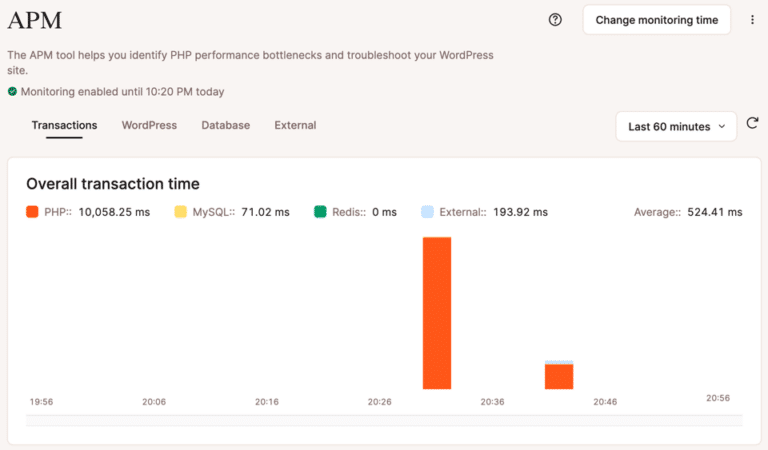
You’ll want to keep a reference of when this all happened, too. Suppose the form normally responds in under a second, but after an update it takes six. Application performance monitoring lets you inspect that request. If the CRM call accounts for five seconds, you know where to investigate. You still need to open the CRM and confirm that the test contact actually appears.
There’s also a distinction worth keeping clear: using AI to write a feature doesn’t necessarily put AI into the live workflow. The CRM plugin may run ordinary PHP with no model involved.
If the plugin also asks a model to classify each lead, you have additional work to manage. You need examples of acceptable classifications, a way to catch poor results, usage-cost checks, and a process for reviewing provider or model changes. A successful API response doesn’t prove the classification makes sense.
Faster builds change how agencies scope and price work
Clients reasonably expect some benefit when AI helps you work faster. If implementation takes less effort, your estimate should reflect that. You don’t need to preserve hours you no longer spend.
The trouble starts when “we can build this quickly” becomes “everything about this should be quick.” A working draft makes review and support less visible to clients who only see the demo.
Make an effort to separate those responsibilities in your proposal. For the CRM feature, show what the engagement includes, like:
- Implementation covers things like the agreed-upon fields, contact behavior, and confirmation flow.
- Testing and release, which includes compatibility checks, failure testing, deployment, and verification.
- Handoff includes notes, ownership, and recovery instructions.
- Ongoing support handles things like monitoring, updates, troubleshooting, and any response commitments.
If the plugin you use relies on an AI model to sort incoming leads, be sure to put the provider’s charges in the proposal as well. Does the client pay through their own account? Or do you include usage in the monthly fee? This is something to think through. If you include it, explain what happens when a busy month pushes the bill over that allowance.
You’ll want to be just as clear about changes that occur later, though. A request to send leads to another CRM means checking a new API and testing where the data ends up. Quote that work separately rather than letting “a small change to the form” become an open-ended commitment that falls into scope creep.
The maintenance agreement should say whether or not you look after the custom plugin. If the CRM changes its API and submissions stop arriving, the client needs to know whether the monthly fee they’re paying covers the repair as well. And your developer needs the same answer before picking up the ticket.
Keep logging hours on the plugin’s project ticket after it goes live. Say you spend two hours writing the code with AI, four testing it, and another two fixing duplicate contacts the next week. That’s eight hours of work to use when quoting a similar plugin. Whether AI saves you time depends on how those eight hours compare with what you normally spend on the same job.
Give teams a consistent (and familiar) place to operate
When a client reports missing leads, the developer responsible for taking the ticket needs a good place to start that’s at least mildly familiar. Relearning a different hosting panel, backup process, and logging setup for every site slows that getting-started process, often unnecessarily.
Kinsta gives agencies a shared operational environment through MyKinsta. The benefit shows up in everyday tasks. Before changing the CRM plugin, your developer can use staging environments to test the repair away from the live form. Make sure the environment suits the test: functional checks and realistic load tests have different resource requirements.
Before release, the team can review available backup and restore options and choose a recovery point. The limits of that recovery should remain visible, including any new submissions a database restore could overwrite and any records already sent to the CRM.
During an investigation, Kinsta APM helps locate slow PHP activity, database queries, and external calls. Logs and analytics add context about errors and changing traffic or resource usage.
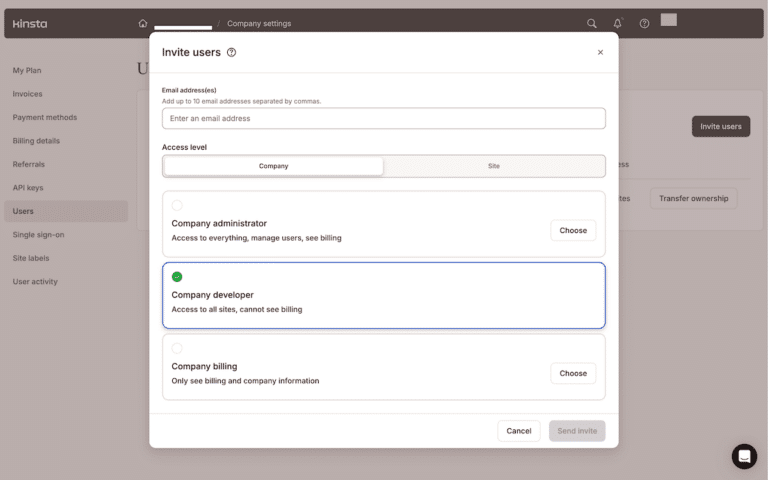
MyKinsta’s user permissions also let you give team members appropriate access without sharing one login. Centralized site management makes it easier to move between client environments and follow a consistent support routine.
Your agency still decides what to approve. It also decides which failures matter and who follows up on them. A consistent platform makes those decisions much easier to carry out. As AI helps your team produce more changes, that familiarity saves time each time somebody tests, releases, or troubleshoots one.
Questions to ask before the next AI-assisted build
Before you promise another quick feature, take a few minutes to discuss what happens after the demo. You can cover much of it in the project ticket:
- What does AI help us finish faster on this particular job?
- Which decisions still need human review?
- Are there any new services or code dependencies that can be introduced?
- How do we test behavior beyond the successful example?
- Who owns the feature after launch, even when the original developer is unavailable?
- What tells us the workflow stops working?
- How do we disable it or reverse the change?
- Does the estimate include release work and the agreed support?
- Is this an experiment with an end date or something we commit to maintaining?
Save the answers where the next person on your team can find them alongside the code location, configuration notes, and release record. A small feature rarely needs a lengthy manual. But it does need enough context for a colleague to investigate it without reconstructing the original conversation with the AI tool.
Build faster, and plan for what comes after
The developer who builds the CRM integration in an afternoon gives the agency a useful head start. The client gets something concrete to review, and the team has more time to work through the details before Friday.
These responsibilities don’t cancel out the time AI saves. They belong in the plan from the beginning, so your agency can take on useful work without accumulating support commitments it can’t meet.
Treat a faster build as an opportunity to deliver well. Keep ownership clear, use a release process your team can repeat, and make problems visible. Kinsta’s managed WordPress hosting gives your team a consistent place to test, monitor, and manage the sites you continue to build.
The post AI doesn’t remove complexity, it changes where complexity lives appeared first on Kinsta®.