A few years ago, buying decisions happened on Google. People searched, clicked through a handful of sites, compared their options, and chose.
That journey is collapsing into a single step. Now people ask AI tools, like ChatGPT, Gemini, or even ,Google to get a direct recommendation and act on it. The “compare a handful of sites” part is gone, and so is your chance to drive a lot of organic search traffic to your sites.
This is why it’s important to track AI visibility along with your organic search traffic. If the AI doesn’t name your brand when it answers, you’re invisible at the exact moment someone is deciding.
But how do you monitor what ChatGPT, Gemini, Perplexity, and Google’s AI Overviews say?
This is why you’ll need AI visibility tools.
I’ve spent the last few weeks putting these tools through real keywords to see which ones are worth paying for…
Here are the best AI visibility tools I’ve tested and recommend.
Quick Picks: Best AI Visibility Tools
Here’s a quick look at all nine tools, including which AI engines they track, what each is best suited for, and starting prices:
| Tool | AI Engines Tracked | Best For | Starting Price |
|---|---|---|---|
| 🥇 Semrush One | ChatGPT, Perplexity, Gemini, Google AI Overviews, AI Mode | All-in-one search visibility (SEO + AI) for professional teams | $139/month |
| 🥈 AIOSEO | ChatGPT, Claude, Gemini, DeepSeek, Perplexity | WordPress users | Free; paid from $49.50/year |
| 🥉 Ahrefs Brand Radar | ChatGPT, Perplexity, Gemini, Google AI Overviews, AI Mode, Copilot, Grok | SEO teams already on the Ahrefs platform | From €358/mo (add-on) |
| 4. Otterly.ai | ChatGPT, Perplexity, Gemini, Google AI Overviews, AI Mode, Copilot | Solo marketers on a budget | $29/month |
| 5. Profound | ChatGPT, Claude, Gemini, Perplexity, Copilot, Grok, Meta AI, DeepSeek, Google AI Overviews | Enterprise brands and agencies | $99/month (ChatGPT only) |
| 6. Peec AI | ChatGPT, Perplexity, Gemini, Google AI Overviews, AI Mode, Copilot | Mid-market teams needing share-of-voice dashboards | $95/month |
| 7. SE Ranking | ChatGPT, Perplexity, Gemini, Google AI Overviews, AI Mode | Small teams that want full SEO + AI tracking in one platform | From $174/month (annual) |
| 8. Writesonic | ChatGPT, Claude, Gemini, Perplexity, Copilot, Grok, DeepSeek, Meta AI, Google AI Overviews, Google Search | Content teams tracking and creating in one tool | $79/month (annual; ChatGPT only at entry) |
| 9. Nightwatch | ChatGPT, Claude, Gemini, Perplexity, Copilot | Rank-tracking + LLM monitoring | From €79/month |
What Are AI Visibility Tools?
AI visibility tools track how often your brand, content, or URLs appear in answers generated by AI search engines like ChatGPT or Perplexity.
They are different from traditional SEO rank trackers, which measure your website’s positions in Google search results.
AI visibility tools are built specifically for generative engine optimization (GEO) tracking: measuring your share-of-voice across the large language models your potential customers are actually using.
You can rank on page one and still rarely appear in AI-generated answers. Likewise, some pages earn frequent AI citations despite not ranking highly in traditional search results. While there’s overlap between SEO and AI visibility, they’re not the same thing. This is why you need both sets of data to understand your true online presence.
What to Look For in an AI Visibility Tool
Here are the main things I look for when choosing an AI visibility tool:
- AI engine coverage — At a minimum, the tool should monitor ChatGPT, Perplexity, and Google AI Overviews. Single-engine tracking misses too much of the AI search space to be actionable on its own.
- Brand mentions vs. URL citations — Knowing your brand is mentioned is useful. Knowing which specific URL gets cited (and which doesn’t) is what lets you take action on the data.
- Brand sentiment — It helps to know not only whether your brand comes up, but how it’s described. Some tools tell you whether an AI answer talks about your brand in a positive, neutral, or negative way, and whether it gets the facts right. This lets you correct a wrong or unflattering description rather than just count the mentions.
- Prompt or query visibility — The best tools tell you which questions trigger AI answers that mention your brand. That’s the data you need to know what to prioritize.
One thing to keep in mind as you read these reports: AI answers are generated fresh each time, so they vary from one user to the next and shift over time. They aren’t fixed rankings.
Instead, read the data as a strong directional signal of where you stand and which way you’re trending, rather than a precise daily count.
Why Trust WPBeginner?
WPBeginner has been the largest free WordPress resource site since 2009, and our editorial team manages real WordPress sites. That means AI visibility is a genuine concern for our own content strategy, not a theoretical exercise.
For this guide, I evaluated each tool on the AI engines it monitors, the depth of data it returns, how actionable the results are, and whether it fits a typical WordPress workflow.
Read more about our editorial process.
1. Semrush One: All-in-One Search Visibility Tool with SEO & AI Tracking
| ✅ Pros of Semrush | ✅ AI visibility tracking alongside traditional SEO metrics — rankings, backlinks, and site audit ✅ Competitive brand-mention monitoring in AI-generated answers ✅ Content optimization recommendations targeting AI citation gaps ✅ Topic clustering and authority-building tools |
| ❌ Cons of Semrush | ❌ It’s a large, full SEO platform, so it can be more than you need if AI visibility is the only thing you’re after |
| Pricing | Starts at $139/month. |
| Best For | All-in-one search visibility (SEO + AI) for professional teams |
Semrush One is a search visibility platform that combines traditional SEO, competitive research, and AI search tracking in a single subscription.
Semrush has been a trusted tool for professional SEO workflows for years. With Semrush One, you get AI visibility monitoring alongside tracking your organic search traffic.
The AI visibility features cover ChatGPT, Perplexity, Gemini, and Google’s AI Overviews and AI Mode. They give you data on where your brand appears in AI answers alongside the organic rankings, backlink data, and site audit reports you’re already using.
That side-by-side view of traditional search and AI visibility in one platform is what separates Semrush from the standalone AI trackers on this list.
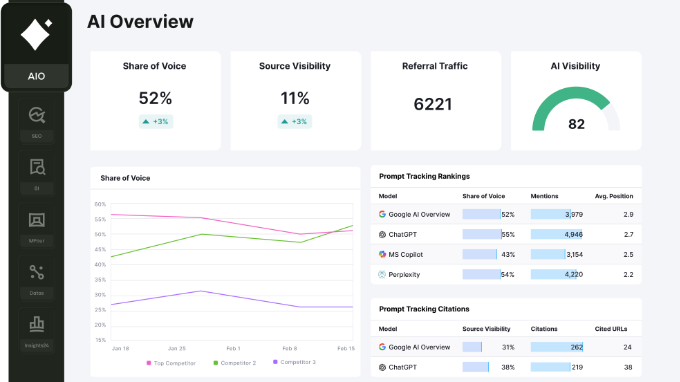
The AI Visibility Toolkit works at the prompt level. Its Prompt Tracking shows you which questions trigger AI answers that mention your brand, and how those positions move over time.
The Brand Performance report turns that into a share-of-voice picture against your named competitors, so you can see who AI answers cite most often in your category and how each brand is described.
It also reads sentiment, which tells you whether an answer talks about you in a positive, neutral, or negative way, and the Visibility Overview surfaces the topics where competitors show up in AI answers but you don’t.
The real payoff is having that next to your organic rankings, backlinks, and site audit in the same Domain Overview. You can line up where you get cited in AI answers against where you rank in classic search, and decide what to fix from one screen instead of using two different tools.
My Favorite Feature
What I like the most is the competitive AI tracking dashboard. I can see my brand’s share-of-voice in AI answers alongside my competitors in the same view where I track traditional keyword rankings.
Seeing both together makes it much easier to spot which content gaps are affecting traditional search and AI visibility at the same time.
Why I recommend Semrush One: It is the strongest option for SEO professionals and marketing teams that need traditional search and AI visibility data in one place. And if you’re already a Semrush customer, then adding AI tracking is a natural extension of what you’re already doing.
2. AIOSEO: WordPress Plugin for AI Visibility Tracking & SEO
| ✅ Pros of AIOSEO | ✅ AI Insights tracks brand presence in ChatGPT, Claude, Gemini, DeepSeek, and Perplexity ✅ Keyword Reports show which brands appear in each AI engine’s answers (currently free) ✅ LLMs.txt Generator free on all plans; creates a plain-text summary of your key content for AI tools to read ✅ AI Schema Generator creates structured data for FAQ, HowTo, Article, and 20+ schema types ✅ Internal Link Assistant, TruSEO Score, and full SEO toolkit included |
| ❌ Cons of AIOSEO | ❌ AI Insights and Keyword Reports still in beta; tracking depth may not yet match dedicated external platforms ❌ Brand Tracker (ongoing monitoring over time) not yet available |
| Pricing | Free Lite plan available. Paid plans from $49.50/year for the first year (Basic plan, 1 site). |
| Best For | WordPress users tracking and optimizing in one plugin |
AIOSEO is the only WordPress-native tool on this list that lets you track where your brand shows up in AI search and then act on what you find, all from inside your WordPress dashboard. Every other option here is a separate external SaaS platform that monitors AI engines from the outside.
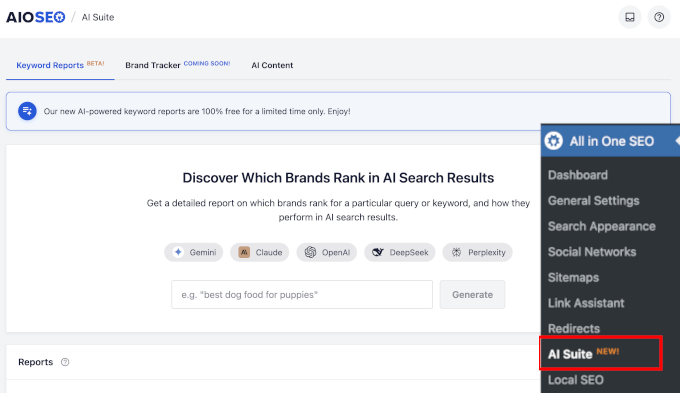
Its AI Suite tracks your brand’s presence across five AI engines and connects that data directly to the tools you need to act on it.
What stands out to me is the tight link between tracking and action.
When you find a keyword where competitors are appearing in AI answers and you’re not, you can use AIOSEO’s LLMs.txt Generator, AI Schema Generator, and FAQ blocks to improve your site’s AI readability without leaving WordPress.
Plus, AIOSEO is not a single-purpose AI tracker. It is the same plugin that handles your TruSEO content scoring, internal links, XML sitemaps, and schema markup.
So, AI visibility layers onto the SEO setup your WordPress site already runs, rather than becoming one more dashboard to check.
Keep in mind that AI Insights is still in beta, and a dedicated external platform may cover more engines or track in greater depth. But what no other platform does is put the tracking and the fixing in the same place you write and publish.
My Favorite Feature
I love the Keyword Reports color-coded table. When I enter a keyword, I can see exactly which brands appear in ChatGPT, Claude, Gemini, DeepSeek, and Perplexity answers side by side, and where my own site doesn’t appear.
That gap view is the most directly actionable output I’ve seen in any AI visibility tool, because it tells me exactly what to work on and which engine to target first.
Why I recommend AIOSEO: The best starting point for WordPress site owners. AIOSEO is the only tool that lets you track AI visibility and use built-in tools to act on that data, all from inside WordPress.
The free plan is worth installing just for the LLMs.txt Generator.
3. Ahrefs Brand Radar: AI Search Visibility Monitoring
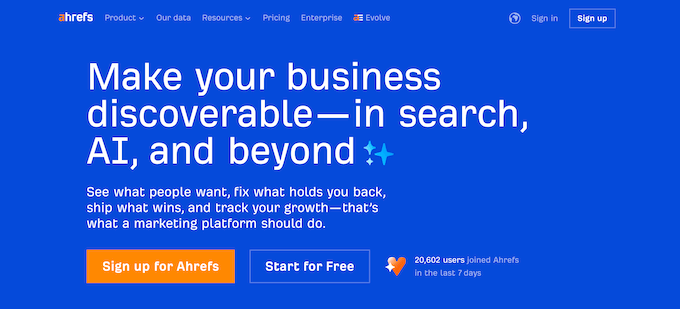
| ✅ Pros of Ahrefs Brand Radar | ✅ Brand mention tracking across ChatGPT, Perplexity, Gemini, Google AI Overviews and AI Mode, and Copilot ✅ Source and context data for each mention ✅ Integration with Ahrefs backlink, keyword, and content performance data ✅ Competitive brand monitoring to track mention growth for competitors |
| ❌ Cons of Ahrefs Brand Radar | ❌ Brand Radar has to be bought separately (from €179/month for one AI platform of your choice) ❌ Does not track Claude |
| Pricing | Brand Radar is a separate add-on starting at €358/month (select AI platforms) on top of an existing Ahrefs subscription. |
| Best For | SEO teams already in the Ahrefs platform |
Ahrefs Brand Radar is a brand mention tracking add-on for the Ahrefs platform that covers the major AI engines (ChatGPT, Perplexity, Gemini, Google AI Overviews and AI Mode, Copilot, and Grok) alongside traditional backlink and web mention data.
For teams already subscribed to Ahrefs for keyword research and link analysis, this is a low-friction addition. Please note that while the basic Ahrefs plan comes with Brand Radar, it doesn’t let you track brand mentions from AI platforms. You may buy Brand Radar separately or as an add-on to your existing Ahrefs plan.
The integration with Ahrefs’ authority and backlink data is genuinely useful for understanding the relationship between your domain’s content quality and its AI citation rate.
When a competitor gets cited in an AI answer, you can immediately see their referring domain profile and content approach.
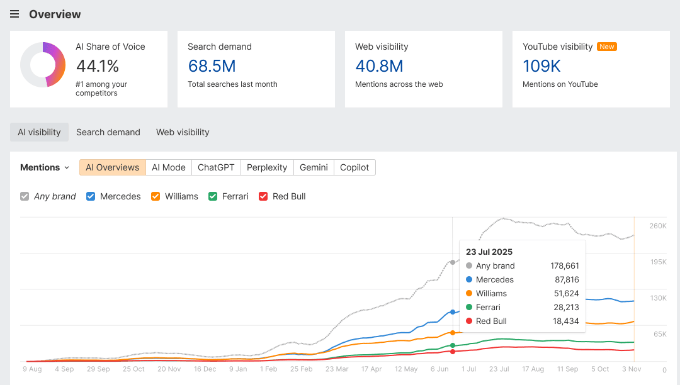
In addition, Brand Radar separates two things most tools blur together: a brand mention, where an AI names your brand in its answer, and a citation, where it links your site as a source. Both matter, and they don’t always move together.
You can be named often without earning the link that sends a reader to you, or get cited on one page while the rest of your site stays invisible. Tracking them separately tells you which problem you actually have.
Brand Radar now spans seven AI engines, including ChatGPT, Perplexity, Gemini, Google AI Overviews and AI Mode, Microsoft Copilot, and Grok, all inside the Ahrefs platform you may already use.
The tradeoff is the cost. It can be bought separately or as a premium add-on (from €179/month for only one AI platform) on top of your existing Ahrefs subscription. As you choose to track brand mentions from more AI platforms, the cost will increase.
My Favorite Feature
What I find most useful is the ability to cross-reference AI citations with domain authority data.
When I see my brand cited in an AI answer, I can check the specific page’s authority and content format in the same dashboard and use that pattern to decide what to create next.
Why I recommend Ahrefs Brand Radar: A strong option for existing Ahrefs subscribers who want broad AI visibility tracking inside the platform they already use, as long as the add-on cost fits the budget.
4. Otterly.ai: Affordable AI Search Monitoring for Solo Marketers
| ✅ Pros of Otterly.ai | ✅ Brand monitoring across platforms including ChatGPT, Google AI Overviews, Perplexity, and Microsoft Copilot ✅ Share-of-voice reporting by AI engine ✅ Prompt library showing which queries trigger AI answers in your category ✅ GEO URL audits (Standard plan and above) ✅ Additional AI engines available as paid add-ons |
| ❌ Cons of Otterly.ai | ❌ Lite plan limited to 15 prompts — too restrictive for consistent monitoring ❌ Standard plan at $189/month is a steep jump from the $29/month entry price |
| Pricing | Lite from $29/month (15 prompts); Standard from $189/month (100 prompts). Annual billing saves 15%. |
| Best For | Solo marketers on a budget |
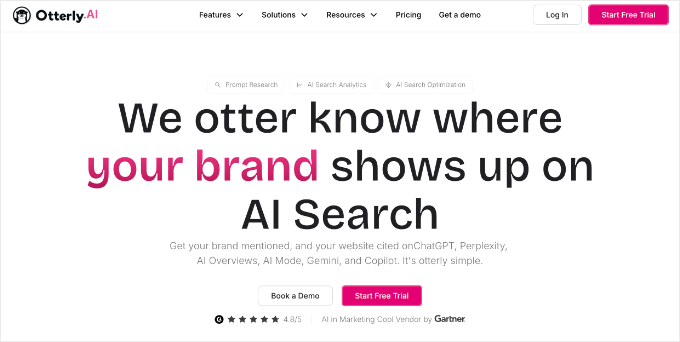
Otterly.ai is an affordable, beginner-friendly AI search monitoring tool that covers ChatGPT, Perplexity, Gemini, Google AI Overviews, AI Mode, and Microsoft Copilot.
At $29/month for the entry plan, it’s the most accessible starting point for solo marketers and small teams that want to understand their AI visibility without committing to an enterprise platform.
The dashboard is clean and fast to read, which matters when you’re trying to build new monitoring habits into an already-busy schedule. I found it significantly easier to get started with than most of the dedicated enterprise platforms on this list.
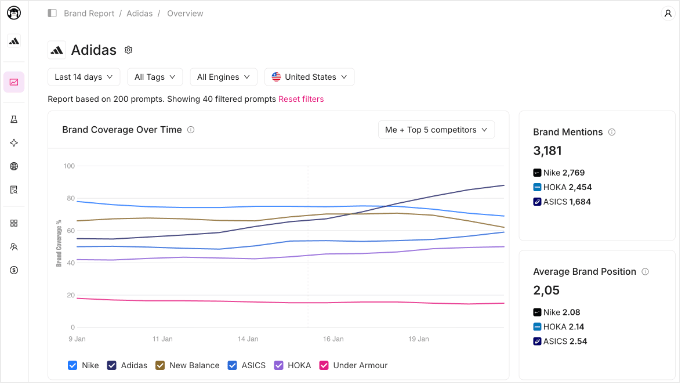
Otterly splits results by engine, so you might show up well in Perplexity but never in Google AI Overviews. That lets you prioritize the engine where you’re losing the most ground instead of treating AI search as one blur.
The honest tradeoff is depth. It’s lighter than the AI visibility tools higher on this list, so you get the core monitoring and the per-engine gap list without the large prompt databases or the deeper competitive intelligence those platforms are built for.
For most small teams, that’s the right trade, because a tool you actually check every week beats a more powerful one you find too heavy to use.
My Favorite Feature
The prompt library is my favorite feature in Otterly. It shows me the specific queries that trigger AI answers in my category, including which ones name my competitors but not me.
That gap list is exactly what I need to build a content calendar around real AI visibility opportunities rather than guesses.
Why I recommend Otterly.ai: A great starting point for anyone new to AI visibility tracking. The Lite plan is affordable enough to trial, and the Standard plan works well for small marketing teams with active publishing schedules.
5. Profound – AI Visibility Platform With 400M+ Prompt Database
| ✅ Pros of Profound | ✅ 9+ AI engine coverage — ChatGPT, Claude, Perplexity, Gemini, Copilot, and more ✅ 400M+ prompt database for competitive intelligence ✅ Share-of-voice reporting across all monitored engines ✅ Citation gap analysis showing which prompts your competitors win ✅ Built for agencies managing multiple client brands simultaneously |
| ❌ Cons of Profound | ❌ Cheapest plan only supports ChatGPT tracking |
| Pricing | Starts at $99/month. |
| Best For | Enterprise brands and agencies |
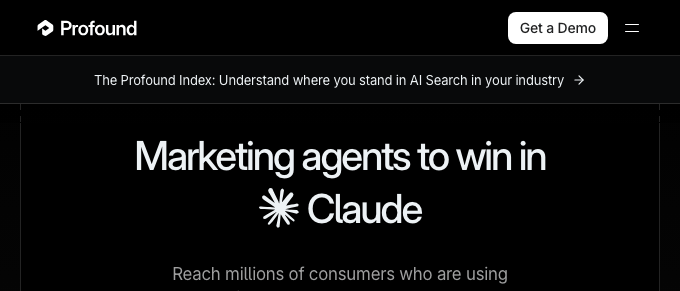
Profound is an enterprise AI visibility platform built for agencies and brands that need the most comprehensive coverage available.
It monitors 9 leading AI engines, draws on a dataset of more than 400 million prompt insights, and has documented 7x citation increases for enterprise clients over 90-day periods.
Profound sets the ceiling for what AI visibility data can look like. For organizations that manage multiple brands or need deep competitive intelligence across every major AI platform, it’s the most complete option on this list.
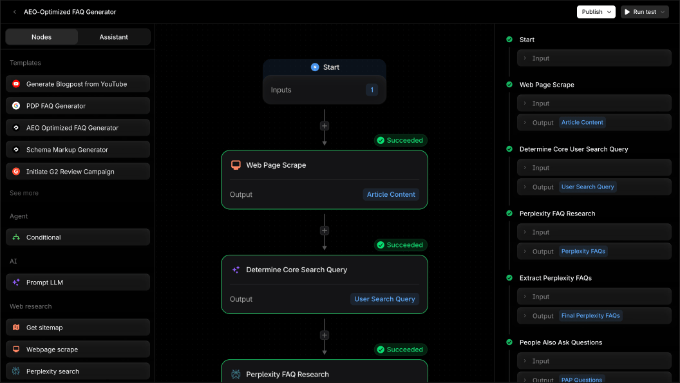
The honest catch is who all that depth is built for. Profound is designed for enterprise brands and agencies tracking multiple brands across all nine engines at once, with competitive intelligence and agent analytics layered on top.
My Favorite Feature
The competitive citation gap analysis is the feature I keep coming back to. Profound shows me exactly which prompts a competitor ranks higher than I do, ranked by prompt volume, so I know which gaps to close first.
No other tool on this list produces a prioritized content roadmap as directly.
Why I recommend Profound: The best choice for agencies managing multiple brands and enterprise marketing teams that need the most complete AI visibility data. For smaller teams, the more accessible options earlier in this list are the right fit.
6. Peec AI – AI Share-of-Voice Tracking with Client-Ready Dashboards
| ✅ Pros of Peec AI | ✅ Multi-LLM share-of-voice tracking and reporting ✅ Brand mention monitoring with sentiment context ✅ Competitive positioning data showing how you rank in AI answers vs. competitors ✅ Clean dashboards designed for team and client reporting |
| ❌ Cons of Peec AI | ❌ Strong on reporting, but light on next steps – it surfaces where your AI visibility stands without offering much built-in guidance on how to improve it |
| Pricing | Starts at $95/month. |
| Best For | Mid-market teams needing share-of-voice dashboards |
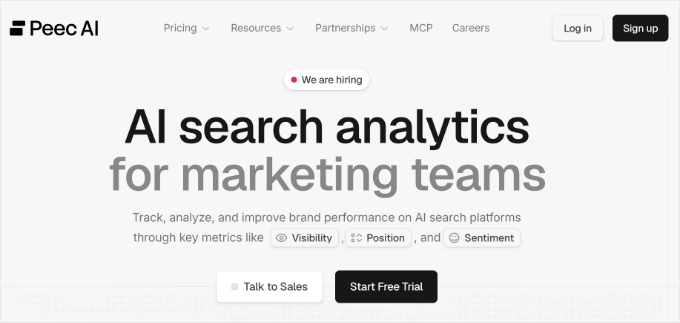
Peec AI is a share-of-voice tracking tool designed for marketing teams that need clear, presentable AI visibility dashboards without using complex enterprise tools.
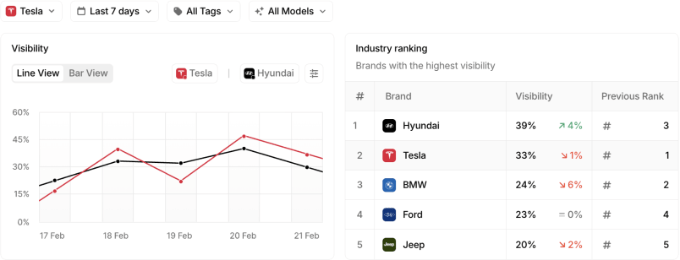
It tracks your brand’s presence across multiple large language models and shows competitive positioning data in a format that’s easy to read and share with clients or internal stakeholders.
The emphasis on clean reporting makes Peec AI particularly well-suited for weekly reviews and client presentations. It gives you a quick, accurate read on competitive positioning without digging through raw analytics.
On its standard plans, Peec AI checks for your brand across six engines: ChatGPT, Perplexity, Gemini, Google AI Overviews, Google AI Mode, and Microsoft Copilot. So, instead of a single overall score, you can see engine by engine.
What I value most here is the sentiment layer. A raw mention count tells you that an AI answer named your brand, but Peec AI also reports whether it described you in a positive, neutral, or negative way. This lets you catch and correct an unflattering or inaccurate description rather than just count the number of times you came up.
My Favorite Feature
The share-of-voice dashboard is the feature that stands out. Peec AI visualizes my brand’s competitive positioning across LLMs in a clean format I can drop directly into a client report without any reformatting. That presentation-ready output can save agencies real time every week.
Why I recommend Peec AI: A solid mid-market option for marketing teams that want clear share-of-voice reporting and presentable dashboards at a fair price point.
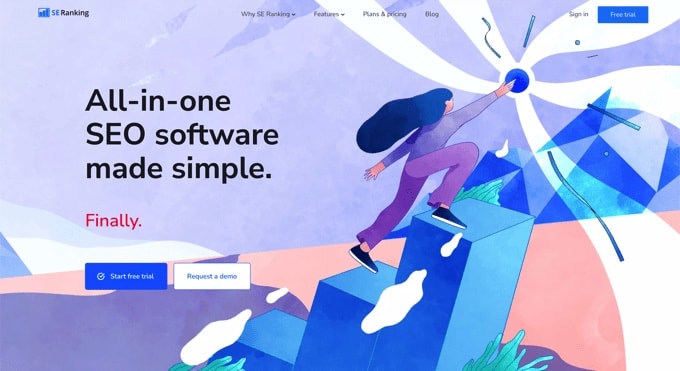
7. SE Ranking – All-in-One SEO Suite with AI Search Tracking
| ✅ Pros of SE Ranking | ✅ Traditional SERP keyword rank tracking (Core plan) ✅ AI Search add-on — Google AI Overviews, Google AI Mode, Perplexity, ChatGPT ✅ SE Visible dashboard for dedicated AI visibility analysis ✅ Competitive research showing which brands appear in AI answers ✅ Full SEO suite: site audit, backlink analysis, and content tools |
| ❌ Cons of SE Ranking | ❌ AI tracking requires a paid add-on on top of the Core plan subscription ❌ Combined cost (~$174/month) is higher than the Core plan entry price suggests |
| Pricing | Core plan from $103.20/month (annual); AI Search add-on from $71.20/month (annual). Combined starting price is approximately $174/month when billed annually. |
| Best For | All-in-one SEO suite + AI tracking add-on |
SE Ranking is a complete SEO platform with site audits, backlink analysis, rank tracking, and content tools, that adds AI Search tracking (Google AI Overviews, AI Mode, Perplexity, ChatGPT, and Gemini) as a dedicated add-on.
For a small in-house team, the appeal is having everything in one place. Instead of running a separate AI visibility tool alongside your SEO stack, you track rankings, audits, backlinks, and AI presence from a single platform. This keeps a lean team from juggling several tools and logins.
The AI Search add-on layers AI tracking onto an already-capable SEO suite, so you’re not managing separate tools for traditional and AI search.
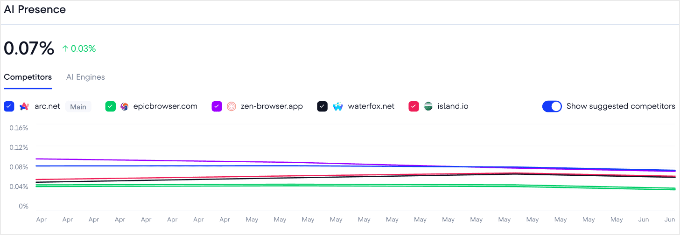
The SE Visible dashboard gives you a cleaner view of AI-specific performance data when you want to go deeper than the main SE Ranking interface.
The competitive research is what makes that data actionable. You can measure any competitor’s brand and domain presence across all five AI engines, then pinpoint the topics where rivals turn up in AI answers and your own site doesn’t.
My Favorite Feature
The side-by-side view of traditional keyword rankings and AI search presence in the same dashboard is what makes SE Ranking’s offering distinct.
Seeing both together revealed something I hadn’t expected: several of my pages ranked highly in traditional search but didn’t appear in AI answers for the same keywords.
That specific type of gap is now something I know to prioritize.
Why I recommend SE Ranking: The best mid-market option for teams that need traditional rank tracking and AI visibility under one subscription. Particularly strong for existing SE Ranking customers who want to add AI monitoring without switching platforms.
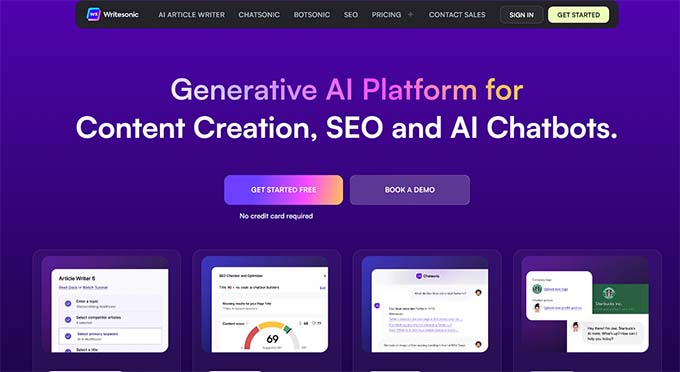
8. Writesonic – AI Visibility Tracking with Built-In Content Creation
| ✅ Pros of Writesonic | ✅ AI search visibility tracking includes ChatGPT, Gemini, and Google AI Overviews ✅ Sentiment analysis for AI mentions (Growth plan and above) ✅ Action Center with content recommendations for improving AI visibility (Enterprise) ✅ AI-powered content creation, site audits, and automated SEO workflows ✅ Prompt tracking — up to 200 prompts per month (Growth plan) |
| ❌ Cons of Writesonic | ❌ Starter plan tracks ChatGPT only; multi-engine coverage requires the $199/month Basic plan ❌ Less compelling as a standalone monitoring tool if you already have a separate content creation process |
| Pricing | Starts at $79/month (Starter, annual billing, ChatGPT tracking only); $199/month (Basic, annual) for ChatGPT, Gemini, and Google AI Overviews. |
| Best For | Content teams tracking and creating in one tool |
Writesonic is a content creation and AI search analytics platform that tracks your brand’s visibility across up to 10 AI platforms, including ChatGPT, Claude, Gemini, Perplexity, and Google AI Overviews. It also has AI-powered content creation tools built into the same platform.
It’s the only option on this list where you can identify an AI visibility gap and then draft the content to fill it without switching tabs.
For content-heavy teams with active publishing schedules, that tight connection between visibility data and content creation is the biggest advantage Writesonic offers over standalone AI tracking tools.
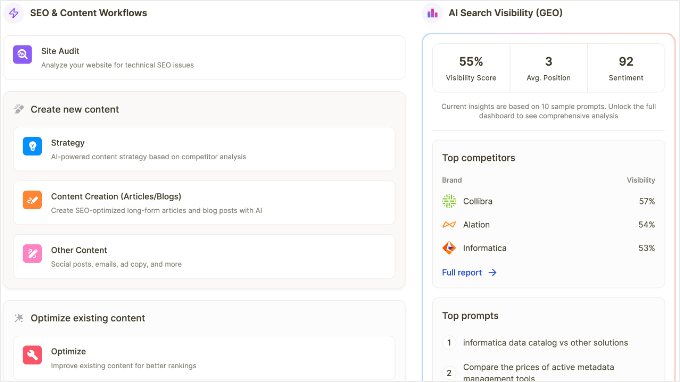
The tracking coverage is also wider than most tools on this list.
On higher tiers, it also adds sentiment analysis that scores how each AI describes your brand, and an Action Center that turns those gaps into specific content and technical fixes. Just note that the $79/month Starter plan tracks ChatGPT only, so reaching that full coverage means moving up a tier.
My Favorite Feature
What works well for active content teams is the tight workflow from gap identification to content creation in one platform. When I find a prompt I’m not appearing in, I can immediately start drafting the article I need to target it without switching tools.
For teams with regular publishing schedules, that tightness of feedback loop adds up over time.
Why I recommend Writesonic: The best choice for content-heavy teams that want to measure AI visibility gaps and produce content to fill them in the same workflow. Less compelling as a standalone monitoring tool if you already have a separate content creation process.
9. Nightwatch – Rank Tracking with Multi-LLM Visibility Monitoring
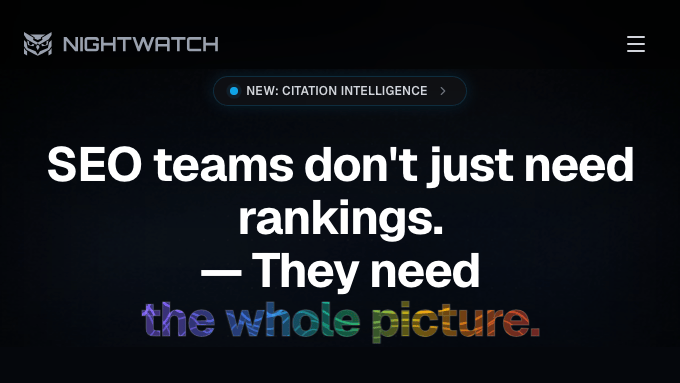
| ✅ Pros of Nightwatch | ✅ AI tracking across ChatGPT, Claude, Gemini, and Perplexity (all plans) ✅ Citation Intelligence that alerts when an AI tool recommends your brand ✅ Traditional SERP keyword tracking (500–7,500 keywords by plan) ✅ Google AI Overviews tracking ✅ Unlimited user seats on all plans |
| ❌ Cons of Nightwatch | ❌ LLM monitoring is a newer feature; dedicated platforms offer more comprehensive AI visibility data |
| Pricing | Starter from €79/month; Professional from €159/month |
| Best For | Rank-tracking teams adding LLM monitoring |
Nightwatch is an established rank tracking platform that has added multi-LLM visibility monitoring to its core suite. Unlike most tools on this list, it puts that data behind unlimited user seats with no per-seat fee, so your whole team can use it. It covers ChatGPT, Claude, Gemini, Perplexity, and Microsoft Copilot on every plan.
It’s built for teams that already track keyword rankings and want to add AI monitoring without switching platforms or paying per user.
The unlimited user seats on all plans is a genuine differentiator for growing teams. AI visibility data is most useful when shared across content, SEO, and marketing, and Nightwatch’s flat-rate pricing means that sharing doesn’t come with a per-seat cost.
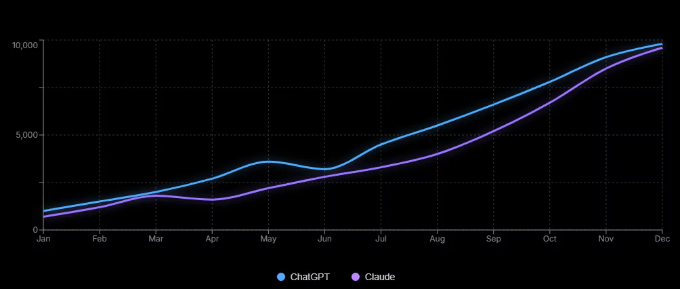
Plus, its Citation Intelligence feature alerts you when an AI tool recommends your brand. This lets you catch movement in your AI visibility without manually re-running the same prompts every week. It also maps each citation back to the page that earned it, which tells you which of your URLs is actually doing the work.
Because Nightwatch started as a large-scale, location-level keyword rank tracker, its AI monitoring sits right next to deep traditional SERP data, covering 500 to 7,500 keywords depending on your plan.
That pairing is the real draw here: you can watch your brand across ChatGPT, Claude, Gemini, Perplexity, and Microsoft Copilot in the same place you already track keyword positions.
My Favorite Feature
I’ve found that AI visibility data gets acted on faster when it’s shared across the whole team, and Nightwatch makes that easy with unlimited user seats and both traditional and AI tracking in one subscription. Flat-rate pricing means nobody gets locked out of the dashboard.
Why I recommend Nightwatch: A competitive option for rank-tracking teams that want to add AI monitoring without paying per user or switching platforms.
How to Improve and Measure Your AI Visibility in WordPress
Tracking where your brand stands in AI search is only useful if you can act on what you find. For WordPress site owners, these three tools work together to close the loop between data and results.
Track With AIOSEO AI Suite
AIOSEO’s AI Insights feature shows your brand’s presence across ChatGPT, Claude, Gemini, DeepSeek, and Perplexity. The Keyword Reports view reveals which queries your competitors are winning in AI answers and where your site isn’t appearing.
Once you’ve identified the gaps, AIOSEO’s built-in tools let you improve your site’s AI readability from the same plugin.
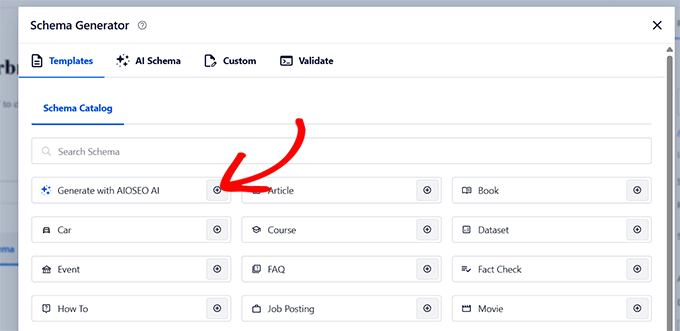
The LLMs.txt Generator creates an llms.txt file (an emerging, optional convention that some AI tools may read), the AI Schema Generator adds structured data that can help AI tools parse and understand your content, and the FAQ and Key Points blocks format your content for AI citation.
Win Citations With SEOBoost
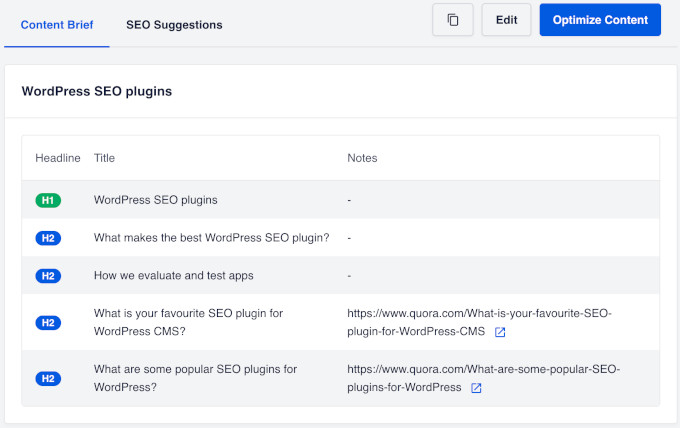
Getting cited by AI often comes down to having the best, most complete content on the topic. SEOBoost analyzes the top-ranking content for your target keywords and identifies exactly what your articles are missing: topics not covered, questions not answered, and depth gaps that competing content fills.
In fact, SEOBoost already powers AIOSEO’s AI Writing Assistant, so the pairing is built in. It integrates directly with AIOSEO in the WordPress Block Editor, so the content recommendations appear as you write rather than in a separate tool.
This is the step between finding a gap in AI answers and producing content that fills it.
Measure the Traffic Impact With MonsterInsights
AI visibility only matters if it drives real traffic. MonsterInsights has an AI Traffic Report (Pro plan and above) that breaks down exactly how many sessions are coming from ChatGPT, Claude, Gemini, and other AI platforms.
This is how you confirm that improvements to your AI visibility are actually driving more visits.
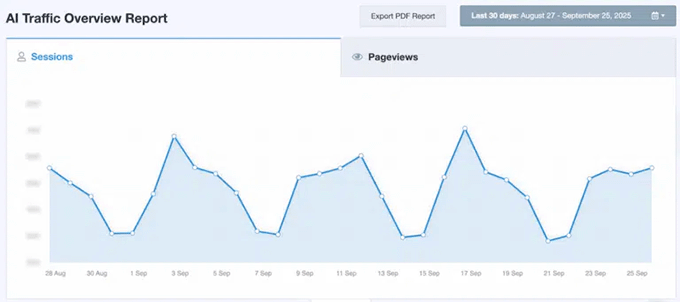
Here’s the workflow in practice: Use AIOSEO to find where you’re not appearing in AI answers, use SEOBoost to fix the content gaps, then use MonsterInsights to confirm the improvements drove more AI-referred traffic.
Which AI Visibility Tool Should You Choose?
If you need a complete SEO and AI visibility platform for a professional marketing team, Semrush is the strongest all-in-one option. The combination of traditional SEO data and AI tracking in one place makes it worth the cost for teams that actively use both.
For most WordPress site owners, AIOSEO is the right starting point. It connects AI tracking with the tools you need to act on that data, and it works inside WordPress without adding a separate subscription.
If you’re new to AI visibility tracking and want to test the concept affordably, Otterly.ai’s Lite plan at $29/month is the lowest-risk entry point. It covers four AI engines and gives you a prompt library that immediately shows you where your competitors are appearing.
For teams that need traditional rank tracking and AI visibility under one subscription at a mid-market price, SE Ranking with the AI Search add-on and Nightwatch are both solid options.
For agencies managing multiple client brands and enterprise teams that need the most complete data, Profound is the right answer.
A note on what’s not on this list: I also looked at other AI visibility tools, including AthenaHQ, Scrunch AI, and Hall, while researching this guide. I kept the list focused on the tools that best fit for bloggers and businesses, so you can pick one with confidence instead of working through every option on the market.
Frequently Asked Questions About AI Visibility
Here are answers to the questions I hear most often about AI visibility tools.
What are AI visibility tools?
AI visibility tools track how often your brand, website, or specific URLs appear in answers generated by AI search tools like ChatGPT, Perplexity, and Google AI Overviews.
They measure your share-of-voice across large language models (LLMs) so you can see whether your content is being cited as a source and compare that to your competitors.
Can I track my brand specifically in ChatGPT?
Yes, most tools on this list track ChatGPT brand mentions or URL citations, including AIOSEO, Ahrefs Brand Radar, Otterly.ai, SE Ranking (with the AI Search add-on), Nightwatch, and Semrush.
The specific data varies by tool. Some show whether your brand is mentioned, while others track which specific URLs are cited in ChatGPT answers.
Is AI visibility different from regular SEO?
Yes, they measure different things. Traditional SEO tracks where you rank in Google’s “blue-link” results, while AI visibility tracking measures where you appear in AI-generated answers.
Those two results don’t always match. A page-one Google ranking and strong AI visibility are independent. You can have one without the other. Both matter, and both require separate measurement.
You need both types of data for a full picture of your search visibility.
Are there free AI visibility tools?
Yes, there are free starting points. If your site runs on WordPress, AIOSEO is the most practical one, because its free Lite plan installs directly in your dashboard and its Keyword Reports are currently free to use.
The dedicated external trackers are mostly paid. The cheapest paid entry I found is Otterly.ai’s Lite plan at $29/month, which is low-cost but not free.
Additional Resources About AI Search and Visibility
I hope this article helped you choose the best AI visibility tool to track your brand in AI search.
Here are some other guides to help you get your content seen in AI search:
- Beginner’s Guide to Generative Engine Optimization for WordPress — How to structure your WordPress content so AI tools can find, understand, and cite it
- How to Get Your WordPress Content Cited by AI Tools — Practical steps for improving your citation rate in ChatGPT, Perplexity, and Google AI Overviews
- How to Optimize Content for Google AI Overviews — Specific tactics for showing up in Google’s AI-generated search summaries
- Best AI SEO Tools for WordPress — AI-powered tools for content creation, keyword research, and on-page optimization (a related but distinct category from AI visibility trackers)
- Best Rank Tracker Tools for SERP Keyword Tracking — Traditional keyword rank tracking for monitoring blue-link positions alongside AI search presence
If you liked this article, then please subscribe to our YouTube Channel for WordPress video tutorials. You can also find us on Twitter and Facebook.
The post 9 Best AI Visibility Tools to Track Your Brand in AI Search first appeared on WPBeginner.