We often think the real risk for a website owner or agency with multiple sites is that one of their sites will go offline. This is especially true as the sales season approaches, as downtime can be very costly for your company and your customers. However, the risk of downtime is measurable and can be addressed. The real risk for site owners is operational uncertainty.
Uncertainty is the constant feeling that something might go wrong. It’s not knowing whether the server will handle traffic from a promotional campaign, not understanding why checkout is slow, or not knowing how costs will rise as the number of site users increases.
Uncertainty lies behind the lack of transparency from providers, incomplete or unclear information, or promises of unlimited resources that take the place of a service’s technical specifications. However, in the IT sector, nothing is unlimited. Behind an exaggerated marketing promise often lie the service’s real limitations.
Operational uncertainty undermines your ability to predict how your site will perform, making it impossible to guarantee the impact or success of a marketing initiative. What happens if you invest thousands of dollars in a promotional campaign and the site slows down dramatically or goes down under the weight of requests because you didn’t know the limit of your server?
The answer is simple: Burned advertising budget, compromised brand reputation, and lost revenue.
Predicting your site’s behavior is more valuable than relying on a promise of uptime, because predictability directly impacts your business outcomes.
The risk is not downtime: Uncertainty kills business
Most hosting providers sell a dream: unlimited resources. However, it must be said that in the field of information technology, nothing is unlimited. Every resource has a limit: the number of requests a CPU can process, the number of users who can access the database at the same time, and the number of PHP processes per second.
Hosting providers often guarantee high uptime—99.999%, possibly backed by an SLA—and you may be satisfied with this guarantee. However, uptime is often an unreliable metric that tells you nothing about the actual load your site can sustain.
Imagine being online during a marketing initiative or shopping season, only to find your shopping cart takes 10 seconds to load because dozens of concurrent customers are finalizing their purchases. Technically, your provider is delivering on its uptime promise. Yet your customers abandon their shopping carts in frustration, you lose sales, and you’ve wasted money on advertising. And to top it off, your IT team has no idea what’s going on or how to fix it. That’s the risk of uncertainty.
When your hosting provider uses the word “unlimited”, they are not offering you more power. They are hiding the reality of limited resources. This lack of transparency is the main factor causing operational uncertainty, preventing you from making decisions based on actual data.
What happens when you reach the actual limit of your hosting?
If your site’s load rises significantly, many providers will not take your site down, but they will reduce the available resources to protect their infrastructure. For example, they may reduce the number of PHP processes, slowing your site. Technically, your site will still be up and running, but it will be virtually unusable.
When things go wrong, uncertainty increases further because you don’t have the data to troubleshoot the problems. You may be forced to open a support ticket and wait for human intervention. Sometimes the problem is further exacerbated because you have to wait for a Level 2 engineer to step in, and you may have to pay extra for qualified support. More lost time and sales, unexpected costs, and big headaches.
If you don’t know the exact limits of your plan (such as the number of PHP threads or the memory limits of your containers), you don’t have the data to plan a product launch, a promotional offer, or advertising for the coming shopping season. The infrastructure that supports your site is a kind of black box that forces you to play guessing games with your company’s resources.
Put it this way: If you were a shipping company, you would know exactly how many containers fit on a ship; if you were a factory, you would know how many units of product you can produce per hour. In practice, in most sectors, capacity is a known variable. In the hosting sector, this is not the case. Providers often tend to hide the capabilities of the sites they host, and if you don’t know how many PHP threads you have, you won’t know for sure how many simultaneous checkouts your site can handle during a campaign.
The unknown factor of ROI
ROI is the ratio of net income (or profit) to investment and is a measure of an investment’s profitability. It is the result of a simple formula:
ROI = (Final Value of Investment – Cost of Investment) / Cost of Investment
To calculate the final value of your investment, you need to know its production capacity. If you are spending $2,000 on infrastructure but don’t know its limits, you won’t know if you are spending the right amount, wasting resources, or buying too little.
But it’s not just about infrastructure costs. If you’ve invested $20,000 in an advertising campaign that would bring in enough traffic to require 100 transactions per second, but the infrastructure your site runs on can only handle a fraction of that, the final value of your investment plummets. Under these conditions, it’s impossible to estimate ROI and therefore make data-driven decisions.
On the other hand, if the hosting infrastructure is transparent, you know how many PHP threads per second are available, how long the checkout process takes, and how many transactions per second your site can process. You can calculate the final value of your investment and provide your management with data-supported ROI estimates.
In this way, your hosting becomes more than a recurring cost—it is a controllable, optimizable asset, allowing you to plan and invest with confidence, without over-provisioning or relying on guesswork about your capacity.
With Kinsta, choosing the optimal plan is easier. You don’t have to sign up for an overpriced plan just because you’re afraid of the unknown. You can choose the right plan for your site and business capacity and scale up only when necessary. Read on to find out how Kinsta eliminates operational uncertainty.
From betting to data-driven decisions: How Kinsta eliminates uncertainty
To eliminate uncertainty, you don’t need a provider who promises you the impossible. You need someone who can give you a roadmap to follow.
At Kinsta, you won’t find a black box; rather, you’ll find transparent architecture and clear technical specifications that let you stop gambling and start calculating the profitability of your investments.
PHP threads: Your real capacity
A PHP thread is a dedicated process that handles an uncached request to your site. PHP threads not only generate the HTML for your site’s uncached pages, but also perform all of your site’s background operations. So:
- Every time a customer adds a product to their shopping cart or updates their profile, a PHP thread processes the operation and updates the database.
- Every time WordPress performs a background operation, such as publishing a scheduled post, sending transactional emails, or synchronizing inventory with your warehouse, it consumes a PHP thread.
- Every time your site interacts with an external service, such as processing a payment with Stripe, sending data to your CRM, or accessing a third-party API, a PHP thread must remain open to handle the external handshake.
- Every time a query runs over your site’s database because the requested data is not cached, a PHP thread is activated to query the database and return the results.
If you don’t have enough PHP threads, a simple background operation, such as an automatic update, can exhaust them, leaving your customers stuck in their shopping carts. Not knowing how many PHP threads you have available prevents you from planning your investments.
At Kinsta, you know exactly how many PHP threads your WordPress site container includes.
No hidden limits: Kinsta architecture is transparent
Instead of vague or exaggerated promises, at Kinsta, you know exactly what your site’s container capacity is. You know exactly how many PHP threads are allocated to your site’s container, and you also know how many CPUs and how much RAM your site has, which data centers are available to you, and every other detail about your plan.
At Kinsta, we strive to continuously update all of our resources, from our blog to our documentation, changelog, and newsletter, to provide our customers with the information they need to best manage their site hosting and accurately plan their business strategies.
For example, the table below shows the default PHP pool, thread count, and memory per thread included in every Kinsta plan:
| Plan | Pool size | Thread count | Memory per thread |
|---|---|---|---|
| Single 35k visits
Single 20GB bandwidth |
512MB | 2 | 256MB |
| Single 65k visits
Single 40GB bandwidth |
1GB | 4 | 256MB |
| Single 125k visits
Single 65GB bandwidth |
1.5GB | 6 | 256MB |
| Single 315k visits
Single 125GB bandwidth |
1.5GB | 6 | 256MB |
| Single 500k visits
Single 250GB bandwidth |
2GB | 8 | 256MB |
| Single 750k visits
Single 500GB bandwidth |
2GB | 8 | 256MB |
| Single 1.25M visits
Single 750GB bandwidth |
5GB | 10 | 512MB |
| Single 1.9M visits
Single 1125GB bandwidth |
6GB | 12 | 512MB |
| Single 2.5M visits
Single 1500GB bandwidth |
7GB | 14 | 512MB |
| Single 3.15M visits
Single 1875GB bandwidth |
8GB | 16 | 512MB |
| WP 2 | 512MB | 2 | 256MB |
| WP 5 | 1GB | 4 | 256MB |
| WP 10 | 1GB | 4 | 256MB |
| WP 20 | 1.5GB | 6 | 256MB |
| WP 40 | 1.5GB | 6 | 256MB |
| WP 60 | 4GB | 8 | 512MB |
| WP 80 | 5GB | 10 | 512MB |
| WP 120 | 6GB | 12 | 512MB |
| WP 150 | 7GB | 14 | 512MB |
| Agency 20 | 3GB | 6 | 512MB |
| Agency 40 | 3GB | 6 | 512MB |
| Agency 60 | 4GB | 8 | 512MB |
However, the number of PHP threads and the memory allocated to each thread are not fixed. If you have specific requirements, you can adjust the number of PHP threads for each site in MyKinsta using the PHP performance add-on under Sites > sitename > Info > PHP performance > Change.
Even those with a dedicated server can modify the number of PHP threads and/or the memory pool allocated to each thread by following these specific instructions.
How to measure process time with Kinsta APM
To help you understand how long your checkout process takes, Kinsta provides a built-in Application Performance Monitoring (APM) tool that lets you identify PHP performance bottlenecks on your WordPress site and calculate the time taken by individual processes, without subscribing to third-party monitoring services such as New Relic.
Available at no extra cost on all plans, our APM tool provides detailed information about your WordPress site’s PHP processes, MySQL database queries, external HTTP calls, and more.
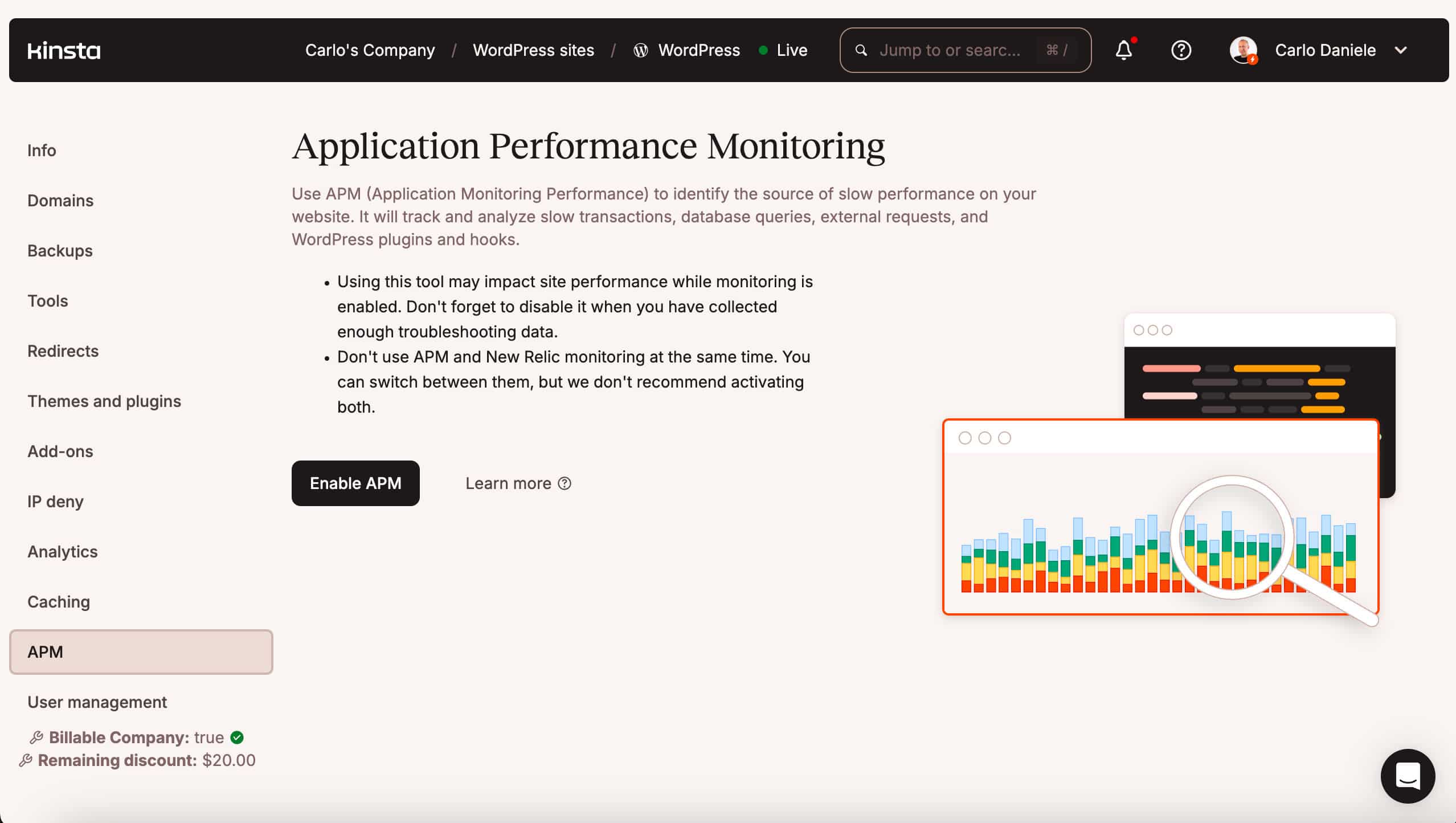
Once you enable site monitoring, you will have access to the data that the system has collected and divided into four tabs:
- Transactions: Here you will find information about the overall transaction time and the slowest transactions.
- WordPress: This tab provides WordPress-specific information, including plugin and hook execution times.
- Database: This tab includes details on database query execution times.
- External: Here you will find details of external HTTP requests.
Once you have confirmed the average execution times for processes such as the shopping cart, you can calculate exactly how many PHP threads you need to provide an optimal checkout experience for your customers. As we mentioned earlier, a site that loads quickly requires fewer PHP threads, which translates into lower costs for you and a better shopping experience for the user.
This is another reason why it’s crucial to choose a hosting provider that guarantees top performance and optimizes your site. That’s why Kinsta, in addition to offering you an extremely fast cloud architecture, provides free Cloudflare integration on all plans, giving all our customers a high-performance CDN to serve your site’s static resources from the location closest to your visitors. In addition to the CDN, our customers benefit from Cloudflare’s Edge Caching, which caches entire HTML pages, shifting most of the load from the origin server to Cloudflare’s edge servers.
In short, Kinsta provides you with the infrastructure and tools to build sites that load super fast, with lower server load, reduced PHP thread requirements, and lower server bandwidth consumption.
How to calculate the number of PHP threads you need
If you know the number of PHP threads assigned to your site’s container and the average time it takes to process your shopping cart, you will know how many transactions per second your site can handle:
PHP Threads / Average process time = Max Dynamic Requests per Second
To understand how to apply this simple formula, consider two different scenarios.
First scenario: Slow hosting and unoptimized website
You have 10 PHP threads and your checkout takes 2 seconds:
Calculations: 10 / 2 = 5 requests per second
Second scenario: Fast hosting and optimized website
You have 10 PHP threads and your checkout takes 0.5 seconds:
Calculations: 10 / 0.5 = 20 requests per second
Regardless of available bandwidth, in the first scenario, your checkout will freeze at the sixth concurrent customer, whereas in the second scenario, it will support up to 20 concurrent requests per second. This is the difference between a fast, performance-optimized site and a website running on a hosting that isn’t up to par with your business.
Isolated resources: Eliminating the risk of noisy neighbors
In traditional shared hosting and even in some VPS configurations, resources are shared between sites hosted on the same server. This means that uncertainty about your site’s capacity is compounded by uncertainty arising from the activity of other sites on the same server. This is the risk inherent in the noisy neighbor effect.
Every Kinsta-hosted website runs in an isolated software container that contains all the software resources required to run the site (Linux, NGINX, PHP, MySQL), meaning the software that runs each site is 100% private and not shared even between your own sites.
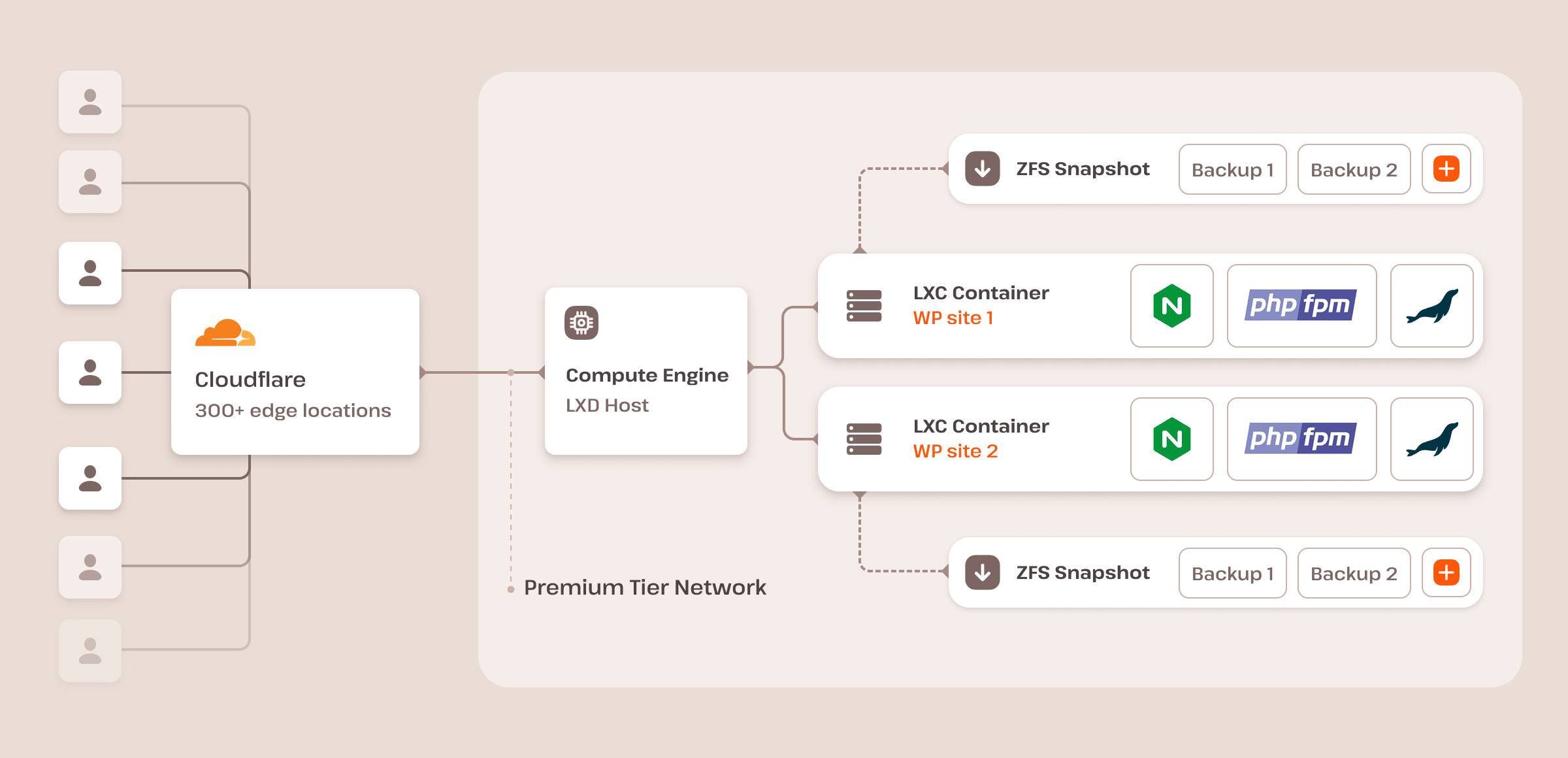
On Kinsta, each container has 12 CPUs and 8 GB of RAM by default, and each staging environment has 1 CPU and 8 GB of RAM.
You can choose between 27 data centers across 5 continents, and your site is secured by our free Cloudflare integration.
- Johannesburg, South Africa (af-johannesburg-1)
- Batam, Indonesia (ap-batam-1)
- Melbourne, Australia (ap-melbourne-1)
- Mumbai, India (ap-mumbai-1)
- Osaka, Japan (ap-osaka-1)
- Seoul, South Korea (ap-seoul-1)
- Singapore,Singapore (ap-singapore-1)
- Sydney, Australia (ap-sydney-1)
- Tokyo, Japan (ap-tokyo-1)
- Montreal, Canada (ca-montreal-1)
- Toronto, Canada (ca-toronto-1)
- Amsterdam, Netherlands (eu-amsterdam-1)
- Frankfurt, Germany (eu-frankfurt-1)
- Madrid, Spain (eu-madrid-1)
- Milan, Italy (eu-milan-1)
- Paris, France (eu-paris-1)
- Stockholm, Sweden (eu-stockholm-1)
- Zurich, Switzerland (eu-zurich-1)
- Jerusalem, Israel (il-jerusalem-1)
- Riyadh, Saudi Arabia (me-riyadh-1)
- Santiago, Chile (sa-santiago-1)
- Sao Paulo, Brazil (sa-saopaulo-1)
- London, United Kingdom (uk-london-1)
- Ashburn, VA (us-ashburn-1)
- Chicago, IL (us-chicago-1)
- Phoenix, AZ (us-phoenix-1)
- San Jose, CA (us-sanjose-1)
This is Kinsta transparency.
Choose certainty over vague promises
When running an online business, the reliability of a hosting partner is not measured by the number of nines they tout in their uptime guarantee, but by their transparency about your site’s real capacity and the architecture that supports it.
Operational uncertainty is a silent killer of your budget. It prevents you from scaling, compromises your marketing efforts, and keeps your IT team on constant alert.
The antidote to uncertainty is a hosting partner that provides certainty about your site’s capacity, clearly defines your PHP thread count, offers fully isolated environments, and lets you track real-time telemetry with a performance monitoring tool.
With Kinsta, you can control your website’s capacity with the same precision you apply to all other components of your business, from inventory to finance.
Don’t trust promises of unlimited resources. Be practical and choose a hosting partner who provides a roadmap to guide your business as it grows.
Ready to take the leap? Check out our plans!
The post Enterprise hosting risk isn’t downtime—it’s uncertainty appeared first on Kinsta®.